Chapter 1: Understanding AI in Business Context
AI is now part of everyday business systems, from customer support to operations and internal decision-making. Many teams adopt it through practical setups such as AI development services, where cost control and reliability matter from day one. This chapter explains how agentic workflows operate in real environments, where they deliver results, and where they fail under pressure. You will understand system limits, cost behavior, and how to apply AI in ways that hold up in production.
1.1. What AI Can & Cannot Do?
1.1.1. Can handle structured, pattern-driven tasks
Appropriate for summarization, classification and data extraction with OpenAI GPT, Google Vertex AI and Amazon Bedrock. Widely used in AI applications with defined inputs and repetitive processes.
1.1.2. Can produce useful outputs, but not guaranteed accuracy
Outputs are probabilistic. The same input can return different results. Systems require validation layers such as schema checks, guardrails, or human review for production reliability.
1.1.3. Cannot ensure deterministic results or handle high-risk decisions
Fails with indeterminate inputs, long multi-step reasoning without orchestration, and tasks requiring exact correctness. Not suitable for financial decisions, legal conclusions, or real-time critical systems without strict control mechanisms.
1.2. Where AI Creates Real Value?
1.2.1. Automates high-volume operational tasks
Delivers clear gains in AI use cases such as support ticket handling, document parsing, and lead filtering. Tools like UiPath and Zapier help reduce manual effort by 30–50% when workflows are structured and inputs are consistent.
1.2.2. Improves decision systems with faster data processing
AI is used by businesses for fraud prevention, forecasting, and customer scoring with tools like DataRobot. They can ingest millions of rows of data in minutes, enabling quicker, more predictable results.
1.2.3. Enhances existing workflows without replacing them
Integrates into systems like CRM and support platforms using tools such as Salesforce Einstein. AI systems generally reduce response times and increase the availability of data without necessarily compromising human control.
1.3. Common Misconceptions About AI
1.3.1. AI works as a fully autonomous system
Many assume systems built with tools like LangChain or AutoGen can run end-to-end without control. In practice, these setups require defined workflows, validation layers, and fallback logic. Without this, outputs become inconsistent and unreliable in production.
1.3.2. More data directly improves model performance
The use of Snowflake and Databricks platforms demonstrates that the performance is determined by the quality of data, its structure, and relevance.
1.3.3. AI reduces operational cost from day one
Tools like AWS SageMaker and Azure Machine Learning introduce upfront costs for infrastructure, integration, and testing. Cost reduction happen only after systems stabilize and replace manual effort at scale.
Chapter 2: The Tool Trap
Teams often start by plugging in multiple tools without defining how the system should operate end-to-end. This leads to disconnected workflows, repeated logic, and inconsistent outputs. This chapter explains why tool-first thinking breaks under production pressure, how short-term productivity gains hide integration issues, and the actual cost of testing multiple platforms. You will see how inadequate tool selection affects latency, maintenance effort, and long-term system stability in real deployments.
2.1. Why Tool-First Thinking Fails?
2.1.1. Ignores system design in favor of quick setup
Teams often start with tools like Zapier without defining data flow, control logic, or failure handling. This results in an AI tool selection that does not match system requirements, leading to inconsistent outputs and rework when moving to production.
2.1.2. Introduces integration complexity early
The interconnection of various services, including the OpenAI API, with orchestration layers and external storage results in tightly coupled pipelines. In reality deployments, a small API change or a spike in latency in one component would break the entire workflow.
2.1.3. Forces early dependency on vendor constraints
Building directly on platforms like Google Vertex AI or Amazon Bedrock without abstraction limits flexibility. As requirements grow, teams face higher costs, restricted customization, and complex migration paths.
2.2. Are These Tools Actually Improving Productivity?
2.2.1. More work gets started, but not more work gets finished (content, marketing, SaaS teams)
Teams using Notion AI or Jasper often see a spike in drafts. A marketing team that earlier published 8 articles a month may now generate 20 drafts, but still publish 8–10. The difference is caused by review time, fact checks, rewrites, and approvals. End of the pipeline output does not grow at the same rate as input.
2.2.2. Automation reduces clicks but adds ongoing maintenance (operations, ecommerce, support)
Using applications such as Zapier and Make, teams avoid manual processes, yet they maintain systems. In an e-commerce environment, order or inventory processes can be automated, but teams continue to spend hours each week to fix failed processes, mitigate API quotas, or address data inconsistencies.
2.2.3. Faster tasks do not shorten delivery timelines (product, engineering, enterprise teams)
Tools such as ClickUp AI and Asana AI help individuals move faster on updates, documentation, or planning. However, release timelines depend on testing, dependencies, and approvals across teams. In most product environments, those constraints remain unchanged, so overall delivery speed stays the same even if individual tasks take less time.
2.3. The Real Cost of Testing Multiple Tools
2.3.1. Repeated rebuilds before anything stabilizes (startup, product, engineering teams)
Tools such as OpenAI API, Anthropic Claude, and Google Vertex AI are often evaluated by teams simultaneously without a system design being locked. In practice, this will result in the re-implementation of the same workflow multiple times because each tool has different behaviour to prompts, latency, and response format.
2.3.2. Fragmented systems increase long-term maintenance burden (engineering, data, operations)
Mixing orchestration layers such as LangChain with data frameworks like LlamaIndex creates uneven system logic. In real deployments, one part of the system may rely on a different schema or API format than another. This forces teams to maintain multiple versions of similar pipelines, increasing debugging time and making even small changes risky to roll out.
2.3.3. Costs appear after scaling, not during experimentation (enterprise, finance, operations)
Running experiments across services like AWS Bedrock and Azure OpenAI Service often looks affordable in early testing. The real issue appears at scale, where unused endpoints, repeated API calls, and overlapping experiments continue running in production. Lacking consolidation, there are hidden layers of cost within the system that only reveal themselves upon greater utilization and stabilization of the billing process.
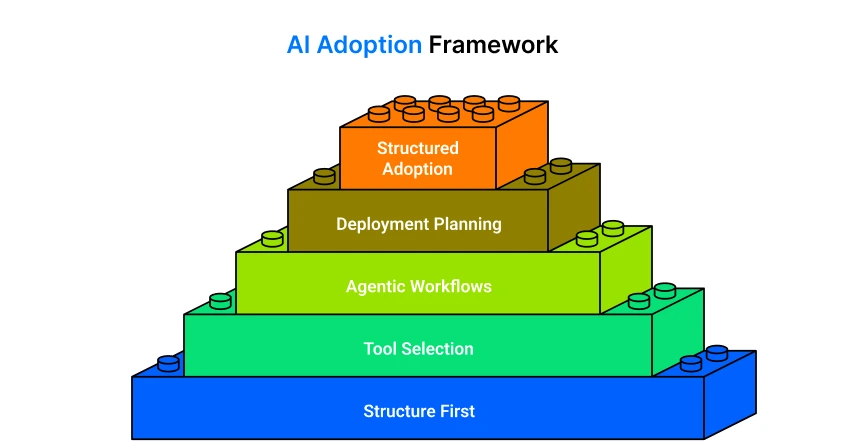
Chapter 3: The AI Adoption Framework
Most AI projects fail because teams start with tools instead of structure. This chapter introduces a practical AI adoption framework for enterprise AI agents, focused on how systems should be designed before any implementation begins. It covers real-world AI tool selection, agentic workflows, and deployment planning across production environments. You will understand how to move from isolated experiments to structured adoption using platforms like OpenAI API, LangChain, and AWS Bedrock, while keeping architecture stable, scalable, and cost-controlled in real business conditions.
3.1. Need → Task → Tool Model
3.1.1. Start from a defined business need, not a tool choice
Every AI system begins with a measurable requirement inside operational workflow, such as reducing response time in support, improving lead qualification accuracy, or automating document classification. Tools like OpenAI API or Amazon Bedrock are only relevant after the problem is clearly defined in operational terms.
3.1.2. Convert the need into a structured, testable task
A broad requirement is broken into executable units with clear inputs and outputs. For example, “improve customer support” becomes “classify incoming tickets into priority levels with defined accuracy thresholds.” This step is essential for real-world AI use cases because it removes interdeterminancy before system design begins.
3.1.3. Select tools based on system function, not popularity
Tools such as LangChain or LlamaIndex are chosen based on what the system needs: retrieval, orchestration, or multi-step reasoning. Many failures in AI tool selection come from forcing generic platforms into mismatched tasks.
3.1.4. Validate alignment through real system behavior
The last stage ensures that the tool selected will work under the production environment, including latency, scale and input variability. Rather than consulting feature lists, teams test behavior using real workloads across AI use cases in startups and enterprise systems, wherein it is ensured that the system behaves when using real workloads.
3.2. Mapping Business Problems to AI Use Cases
3.2.1. Start by classifying the business problem clearly
Every system begins with a real operational issue, such as delayed customer response, manual data entry, or inefficient reporting. In enterprise AI systems, this step defines whether the problem is classification, automation, prediction, or retrieval. Without this clarity, AI use cases for startups often fail because teams skip problem framing and jump directly to implementation.
3.2.2. Translate the problem into a functional AI capability
Once the problem is defined, it must be mapped to a capability such as text generation, clustering, forecasting, or decision support. For example, “slow customer replies” maps to response automation, while “unqualified leads” maps to scoring systems. This step ensures the solution is tied to a measurable function, not a vague idea of “using AI.”
3.2.3. Match the capability with a suitable system pattern
After recognizing the capability requirement, the system architecture will define the need for LLM APIs, retrieval layers, or automation workflows. The choice of OpenAI API, LangChain, etc., will be driven by functionality, and not preference.
3.2.4. Validate fit against real-world constraints before deployment
The final step checks performance under actual conditions such as latency, data variation, and operational load. Many AI systems fail here because they only work in controlled environments. Proper validation ensures the mapped use case can survive production demand without breaking workflows or increasing hidden costs.
3.3. Identifying High-Impact Opportunities
3.3.1. Focus on high-volume operational work with measurable effort
The best starting point is work that repeats at scale and consumes clear human time, such as support handling, invoice checks, and internal request resolution. In real systems, teams often find that 30–60% of the daily workload sits in these repetitive flows. This is where AI delivers early efficiency gains because the structure is stable and inputs are predictable.
3.3.2. Target workflows where delay directly affects business outcomes
Some processes lose value simply because they take too long. In sales and support systems, delays beyond a few minutes can reduce conversion rates by 20–40%, depending on the industry. These workflows are stable candidates for automation because reducing response time improves throughput without changing core business logic.
3.3.3. Identify areas with high correction and rework rates
Workflows that require repeated manual fixes signal structural inefficiency. In operational reviews, it is common to see 25–35% of reports, entries, or internal documents needing correction after first completion. These systems create hidden workload and are suitable for structured automation using workflow tools like Apache Airflow or n8n.
3.3.4. Prioritize systems that scale poorly with manual effort but well with automation
The highest-impact opportunities are systems where workload increases linearly but output does not improve at the same rate. Reporting pipelines, compliance check and internal data processing are examples. Snowflake and Databricks are frequently employed in such environments to organize and scale processing without adding the same number of headcount to operations.
Chapter 4: Strategic Decisions
The chapter is based on practical decision-making in AI adoption, when to develop systems internally, when to purchase existing solutions, and when to enhance current processes. It breaks down cost, speed, and control tradeoffs that influence enterprise AI agents in real deployments. You will also learn when to avoid AI altogether to prevent unnecessary system complexity, wasted engineering effort, and poorly aligned AI use cases for startups and production environments.
4.1. Build vs Buy vs Augment
Choosing between building, buying, or augmenting defines how an organization controls AI cost, system ownership, and scalability in production environments. This decision directly impacts long-term maintenance, deployment speed, and flexibility of enterprise AI agents. In most enterprise setups, the wrong choice at this stage leads to unnecessary complexity and delayed value realization in ai agent for business growth initiatives.
| Approach | Description | When to Use | Strategic Impact |
|---|---|---|---|
| Build | Full in-house development of AI systems, including models, workflows, and infrastructure. | When differentiation, data control, or deep customization is required. | Highest control, highest engineering effort, higher long-term AI cost. |
| Buy | Adoption of ready-made AI platforms or SaaS solutions. | When the speed of deployment is more important than customization. | Fast rollout, limited flexibility, vendor dependency. |
| Augment | Adding AI capabilities to existing systems and workflows. | When legacy systems already exist and need incremental AI integration. | Balanced control and cost, moderate integration complexity. |
4.2. Cost vs Speed vs Control Tradeoffs
The balance between cost, time, and control affects how well AI systems can scale under practical circumstances. The factors determine infrastructure choices, help select models, and set boundaries on the amount of optimization possible. In enterprise environments, misalignment between these factors often leads to inflated AI costs or reduced system performance under load.
| Factor | Focus Area | Tradeoff | Business Impact |
|---|---|---|---|
| Cost (AI cost) | Reducing infrastructure and operational expenses | Limits experimentation and system flexibility | Lower spend but slower iteration cycles |
| Speed | Fast deployment of AI systems | Reduces architectural depth and optimization time | Rapid time-to-market for AI solutions |
| Control | Full ownership of data, models, and workflows | Increases engineering and maintenance load | Better compliance and customization |
| Risk Management | Stability and failure handling in production | Slows deployment due to safeguards | Reduces system failures and operational risk |
4.3. When NOT to Use AI
Avoiding AI is a strategic decision in itself, especially when system constraints, risk exposure, or cost structures do not support automation. A scalable AI risk management strategy ensures AI is only deployed where it adds measurable value and does not introduce operational instability or unnecessary complexity in AI agents for business growth systems.
When workflows are not clearly defined
Unstructured processes lead to unreliable outputs and inconsistent system behavior. AI amplifies ambiguity instead of resolving it.
When decisions require strict determinism
Use cases like financial reconciliation or compliance validation cannot tolerate probabilistic outcomes.
When the AI cost exceeds the operational benefit
If infrastructure, inference, and maintenance costs exceed the efficiency gains, deployment becomes economically unjustified.
When accountability must remain fully traceable
Regulated environments require deterministic decision logs that AI systems cannot always guarantee.
When failure handling cannot be absorbed safely
If the system cannot recover from incorrect outputs without business disruption, AI introduces operational risk instead of value.
Chapter 5: AI in the Software Development Lifecycle
AI changes how software moves from idea to production. It reduces manual effort in some stages, but it also introduces new risks tied to data quality, non-deterministic outputs, and cost variability. A reliable AI-enabled lifecycle requires tighter validation, measurable benchmarks, and continuous monitoring at every stage.
5.1. Planning & Idea Validation
AI projects fail early when data assumptions are wrong. Before committing engineering effort, validate whether the required data exists, is accessible, and is usable.
Start with:
- Data feasibility: volume, structure, labeling quality.
- Use-case clarity: define what the AI system must produce and under what constraints.
- Baseline metrics: accuracy targets, acceptable latency (e.g., <300 ms for real-time systems), and cost per request.
For example, a support chatbot without at least a few thousand high-quality historical conversations will struggle to produce reliable responses. In such cases, teams either delay the project or shift to a rules-based fallback.
Define success early:
- Minimum acceptable accuracy (e.g., 85% intent classification accuracy).
- Maximum response latency.
- Cost ceilings per 1,000 requests.
Without these, evaluation becomes subjective, and projects drift.
5.2. Design & Prototyping
Design shifts from static architecture to probabilistic system behavior. You are not just designing flows, you are designing how the model behaves under uncertainty.
Key decisions include:
- Model selection: trade-offs between latency, cost, and output quality
- Prompt design vs fine-tuning: prompts are faster to iterate; fine-tuning improves consistency but adds cost and maintenance
- Fallback mechanisms: define what happens when the model fails or produces low-confidence output
Include:
- Confidence scoring thresholds (e.g., fallback if confidence <0.7)
- Structured output constraints (JSON schemas, validation layers)
- Human override paths for critical operations
Prototype using small datasets and controlled scenarios. Avoid scaling before validating output reliability.
5.3. Development & Code Generation
AI development services increase speed but introduce verification challenges. Generated code often appears correct but may include logical errors, insecure patterns, or unnecessary dependencies.
To control this:
- Enforce code review for all AI-generated outputs.
- Use static analysis tools to detect vulnerabilities.
- Validate dependencies for security and maintenance risk.
Focus areas:
- API integration reliability.
- Input/output validation layers.
- Error handling for unpredictable model responses.
Example: AI-generated API handlers may skip edge-case validation, leading to runtime failures under malformed input. These issues typically surface only under load.
Track:
- Defect rate in AI-generated code vs manually written code.
- Time saved vs time spent fixing the generated output.
- Testing & QA Automation.
Traditional deterministic testing does not fully apply. AI systems require evaluation across variable outputs and edge cases.
Implement:
- Evaluation datasets with representative and edge-case inputs.
- Regression testing using fixed prompt sets.
- Output scoring based on correctness, relevance, and format compliance.
Use:
- 100–500 test cases for initial validation.
- Continuous expansion of test sets based on production failures.
Define:
- Pass thresholds (e.g., 90% acceptable responses).
- Failure categories (incorrect, incomplete, hallucinated, format error).
Example: A content generation system should be tested against prompts designed to trigger hallucinations, not just standard use cases.
5.4. Deployment & Monitoring
Deployment is not the endpoint. AI systems require continuous observation and adjustment.
Monitor:
- Output quality (user feedback, error rates).
- Latency (response time under load).
- Cost (token usage, API calls per session).
- Model drift (performance degradation over time).
Set operational thresholds:
- Alert if latency exceeds defined limits (e.g., >500 ms).
- Alert if the cost per request increases beyond baseline by 20–30%.
- Trigger review if output accuracy drops below the defined threshold.
Include:
- Logging of inputs and outputs (with privacy controls).
- Human-in-the-loop review for high-risk decisions.
- Versioning for prompts, models, and datasets.
Example: A recommendation system may perform well initially but degrade as user behavior shifts. Without monitoring, this decline remains unnoticed until it impacts business metrics.
Chapter 6: AI-Augmented vs AI-Native Systems
The distinction between AI-augmented and AI-native systems is not semantic. It defines how critical AI is to system functionality, how the system is operated, and how risk is managed. Many teams misclassify their systems early, which leads to poor architectural decisions, unstable deployments, and uncontrolled costs.
An AI-augmented system uses AI as an assistive layer. The system can continue to function without AI, although with reduced efficiency or user experience. Common examples include code suggestion tools, content drafting assistants, or search enhancements. Tools such as GitHub Copilot or Grammarly fall into this category. If these tools fail, the core workflow still operates.
An AI-native system, in contrast, depends on AI for its core functionality. Removing the model breaks the system. Recommendation engines, fraud detection platforms, and dynamic pricing systems are typical examples. Platforms like Amazon Personalize or fraud detection pipelines built on TensorFlow operate as AI-native systems. Their outputs directly drive system behavior, not just assist it.
6.1. Key Differences
The boundary between these two approaches becomes clear when you examine failure impact and system dependency.
In AI-augmented systems:
- AI improves speed or usability, but fallback logic exists.
- Failures degrade experience, not system integrity.
- Testing remains mostly deterministic.
In AI-native systems:
- AI drives core decisions and outputs.
- Failures directly impact business outcomes.
- Testing must account for probabilistic behavior and drift.
Operationally, AI-native systems require infrastructure that traditional systems do not. This includes continuous retraining pipelines, dataset versioning, and structured evaluation workflows. Tools such as MLflow and DVC are commonly used to track experiments, manage datasets, and maintain reproducibility.
A key data point: in production ML systems, model performance can degrade by 5–20% over a few months due to data drift if no retraining pipeline is in place. This is rarely a concern in AI-augmented systems but is critical in AI-native architectures.
6.2. Operational Differences
AI-native systems introduce continuous operational overhead. Unlike traditional services that stabilize after deployment, these systems require ongoing adjustment.
Core operational requirements include:
- Continuous retraining: models must be updated as new data becomes available
- Data versioning: datasets must be tracked to reproduce results and debug failures
- Evaluation pipelines: automated testing against benchmark datasets before every deployment
For example, using Kubeflow or Apache Airflow, teams can automate retraining and validation pipelines. Without this layer, model updates become manual, error-prone, and inconsistent.
Cost behavior also differs. AI-native systems often scale with usage in a non-linear way. In API-based architectures, inference costs can increase 3–5x within a single quarter if request volume or token usage grows unexpectedly.
6.3. Transition Strategy
Most organizations should not start with AI-native systems. A staged transition reduces risk and improves cost control.
A practical transition path looks like this:
- Start with AI augmentation to validate the use case.
- Measure ROI in terms of time saved, accuracy gained, or conversion improvement.
- Isolate components where AI consistently adds value.
- Gradually shift those components into system-critical paths.
During this transition, define hard thresholds:
- Accuracy consistently above 85–90%.
- Latency within acceptable limits (e.g., <500 ms for real-time use).
- Cost per request is stable within the budget range.
For example, a support automation system may begin as a suggestion tool for human agents. Once the model handles 50% or more queries with high accuracy, it can be promoted to an AI-native auto-response system with human fallback.
Tools like LangChain or Haystack are often used during this phase to structure AI workflows before committing to full system dependency.
6.4. When to Move to AI-Native
The decision to move to an AI-native architecture should be based on measurable triggers, not assumptions.
You should consider the transition when:
- AI contributes more than 40–50% of the system’s core value.
- Manual fallback becomes operationally inefficient or costly.
- Data pipelines are stable and continuously updated.
- Model performance remains consistent across evaluation cycles.
A practical example is recommendation systems in e-commerce. Initially, recommendations may be rule-based. As AI models begin to drive a significant portion of user engagement (often 30–60% of clicks in mature systems), the system shifts to AI-native because manual approaches cannot scale or compete.
Another indicator is operational load. If human review is required for more than 30–40% of AI outputs, the system is not ready for AI-native transition.
AI-augmented and AI-native systems require different design, testing, and operational strategies. Treating them the same leads to instability and cost overruns. Clear system boundaries, measurable thresholds, and a staged transition approach allow teams to scale AI capabilities without introducing unnecessary risk.
Chapter 7: Developers in the Age of AI
AI has shifted the role of developers from writing most of the code manually to designing, validating, and orchestrating systems that include AI components. Productivity gains are measurable, but they come with increased responsibility for verification and control. Tools such as GitHub Copilot and ChatGPT now generate 30–60% of initial code in many teams, reducing time spent on boilerplate coding and basic debugging.
7.1. Task-Level Shift in Development Work
Developers are spending less time on repetitive tasks such as CRUD operations and syntax-level fixes. Instead, they focus on prompt engineering, output validation, and system orchestration. Generated code often requires refinement, especially for edge cases and input validation. In practice, 20–30% of AI-generated code needs modification before production use.
7.2. New Skill Requirements
Developers must build skills beyond coding. Prompt structuring is critical, where inputs are defined with constraints and expected formats to reduce ambiguity. Model evaluation is required to measure precision, recall, and hallucination rate, typically keeping errors below 5–10% for production systems. API orchestration and data pipeline understanding are also essential. Tools like LangChain and Apache Airflow are widely used to manage workflows and integrations.
7.3. Human + AI Collaboration Models
Teams follow structured collaboration patterns. The reviewer model relies on AI for generation and developers for validation. The pair model enables real-time assistance during coding. The supervisor model allows developers to define constraints while AI executes tasks within those limits.
7.4. Example Workflow: AI-Assisted API Development
A developer defines a structured prompt, generates an API, and validates security, edge cases, and dependencies. The system is tested across 50–100 scenarios and deployed with monitoring thresholds such as latency above 500 ms or error rates above 2%, ensuring reliability alongside increased AI-powered API development speed.
Chapter 8: Hidden Risks in AI Development
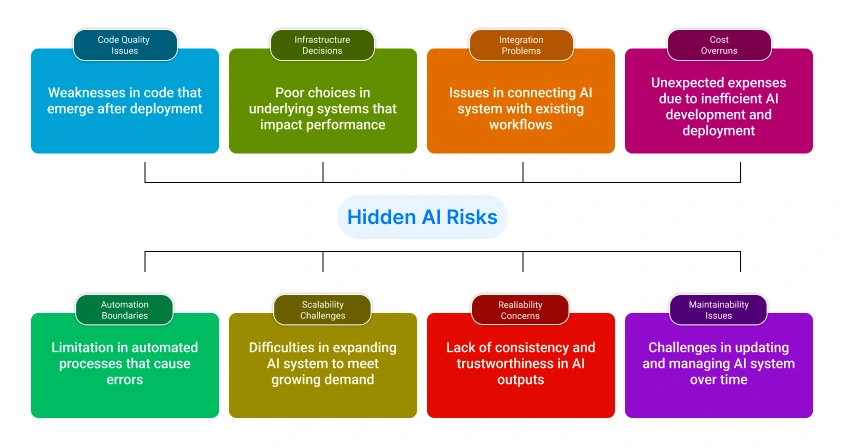
AI systems introduce risks that are not always visible during early development. These risks typically surface after deployment, when scale, variability, and real-world usage expose weaknesses in code quality, automation boundaries, and infrastructure decisions. Without explicit controls, these issues accumulate and impact reliability, cost, and maintainability.
, only 21% of organizations report that they have successfully scaled AI across multiple business units, indicating that most AI initiatives struggle beyond initial deployment due to operational and integration challenges.
8.1. Technical Debt from AI Code
AI-generated code introduces structural technical debt that is difficult to detect during initial development because outputs often appear complete while lacking validation logic, consistent patterns, and secure dependency handling; as AI-generated contributions reach 40–60% of a codebase, even a small defect rate leads to duplicated logic, weak error handling, and increased maintenance overhead, making refactoring complex due to unclear implementation reasoning, which requires strict code review, automated static analysis, and dependency auditing to prevent long-term degradation.
8.2. Over-Automation Pitfalls
Over-automation occurs when AI systems are allowed to operate without sufficient validation layers, resulting in direct propagation of incorrect outputs into production workflows, especially in high-impact areas such as financial processing or user communication; if more than 20–30% of outputs still require correction, removing human oversight introduces unacceptable risk, as errors scale rapidly and become harder to detect, making it necessary to enforce confidence thresholds, rule-based validation, and escalation mechanisms before full automation is implemented.
8.3. Vendor Lock-in Challenges
Vendor lock-in arises when systems depend heavily on external AI providers for models and infrastructure, creating constraints around cost, flexibility, and control, as switching providers often requires prompt redesign, integration changes, and full regression testing; this dependency becomes critical when pricing changes impact operating costs or when model behavior cannot be replicated elsewhere, with API-based systems frequently experiencing 3–5x cost increases as usage scales, which can be mitigated by abstracting model access through internal APIs, maintaining multi-provider compatibility, and enforcing strict cost monitoring at the request level.
Chapter 9: AI Code Generation Tools
AI code generation tools are now integrated into modern development workflows, but their effectiveness depends on where and how they are used. These systems accelerate output generation, yet they require strict validation to ensure reliability, security, and maintainability.
9.1. What They Actually Do?
AI code generation tools such as GitHub Copilot and ChatGPT generate code snippets, API integrations, test cases, and documentation based on prompts or existing context; they operate by predicting likely code patterns rather than understanding system intent, which means outputs are syntactically correct but may lack architectural consistency, input validation, or security controls, especially in complex environments like cloud based mobile apps or AI app development services.
9.2. Best Use Cases (MVP, Debugging, Scaling)
These tools are most effective in early-stage development and repetitive tasks, including MVP development solutions, where speed is critical and architecture is still evolving; they support rapid prototyping for teams building a build MVP app, assist in debugging by identifying common errors, and help scale development by generating boilerplate across services, which is particularly useful in bespoke mobile app development or when teams hire mobile app developers in India to accelerate delivery timelines while maintaining baseline consistency.
9.3. Cost vs Productivity Gains
AI tools reduce development time by 20–40% in tasks involving boilerplate or standard integrations, but they introduce hidden costs through validation, rework, and increased testing effort; while initial productivity gains are clear, teams must account for additional review cycles and potential defect resolution, especially in regulated environments such as build healthcare app projects, where incorrect outputs can lead to compliance risks and higher remediation costs.
9.4. When NOT to Use Them
AI code generation should not be used for core system logic, security-critical components, or complex architectural decisions where precision is required; in scenarios such as mobile apps for cloud computing or systems requiring strict data handling, reliance on generated code without deep validation increases risk, making manual implementation more reliable for critical paths where correctness, performance, and maintainability are non-negotiable.
Chapter 10: AI UI/UX Design Tools
AI UI/UX tools accelerate design workflows, but they introduce trade-offs in control, consistency, and production readiness. Teams must decide where speed is acceptable and where precision is required, especially when building user-facing products such as cloud-based mobile apps.
10.1. Rapid Prototyping vs Production Design
AI tools such as Figma AI and Uizard generate wireframes, layouts, and basic interaction flows from prompts or sketches. This reduces prototyping time from days to hours, which is useful in MVP development services and early-stage product validation. However, these outputs are not production-ready. They often lack design system consistency, accessibility compliance, and responsive behavior. In bespoke mobile app development, production design still requires manual refinement, component standardization, and usability validation before deployment.
10.2. Speed vs Quality Tradeoffs
AI-driven design improves speed but introduces variability in output quality. Generated layouts may look complete, but often miss spacing consistency, interaction states, and edge-case handling. For example, an AI-generated onboarding flow may not account for error states or localization requirements. In generative AI for app development, this leads to rework during development phases.
Teams typically achieve 50–70% faster initial design output using AI tools, but 20–30% additional time is spent refining these designs to meet production standards. For high-impact applications such as building healthcare app projects, where usability and compliance are critical, manual design validation cannot be skipped.
10.3. Cost vs Hiring Designers
AI tools reduce upfront design costs but do not fully replace experienced designers, especially for complex systems. The trade-off depends on project stage, complexity, and required design quality.
| Factor | AI Design Tools | Hiring Designers |
|---|---|---|
| Initial Cost | Low (subscription-based) | High (salary or contract) |
| Speed | High (hours for prototypes) | Moderate (days to weeks) |
| Design Quality | Moderate (requires refinement) | High (production-ready) |
| Consistency | Variable (depends on prompts) | High (design systems applied) |
| Scalability | Limited for complex systems | Strong for large-scale products |
| Best Use Case | build MVP app, quick validation | Full-scale products, critical UX |
For teams building an MVP app, AI tools provide a cost-effective way to validate ideas quickly. However, for production systems or user-critical flows, hiring designers ensures consistency, usability, and long-term maintainability.
Chapter 11: AI Backend & Database Tools
AI is increasingly used in backend development to generate APIs, database schemas, and integration layers. This reduces setup time but introduces constraints in system design, especially when moving from prototypes to scalable architectures in AI app development services.
11.1. Auto APIs & Schema Generation
AI tools such as Postman AI and Hasura can generate REST or GraphQL APIs, database schemas, and query structures based on minimal input. This is useful in MVP development services and early-stage builds where speed is critical. Developers can quickly create endpoints, connect databases, and expose services without writing full backend logic.
In scenarios of developing Android apps, this reduces backend setup time from days to hours. However, generated schemas often lack normalization, indexing strategies, and security layers, which must be manually implemented before production.
11.2. Limitations in Complex Systems
AI-generated backend logic struggles in systems with high complexity, multi-service orchestration, or high performance requirements. It does not account for distributed system challenges such as concurrency control, rate limiting, or fault tolerance. In mobile apps for cloud computing, where backend services must scale across regions, generated APIs often fail to handle load balancing and data consistency requirements.
11.3. MVP vs Scalable Architecture
AI-generated backend components are effective for rapid prototyping but require restructuring for scalable systems. The differences between MVP-level architecture and production-ready systems are significant.
| Factor | MVP Architecture (AI-Generated) | Scalable Architecture (Engineered) |
|---|---|---|
| Development Speed | High (hours to days) | Moderate (days to weeks) |
| Schema Design | Basic, often denormalized | Optimized with indexing and relationships |
| Security | Minimal or missing | Full authentication, validation, and encryption |
| Scalability | Limited | Designed for horizontal scaling |
| Reliability | Suitable for testing | Production-grade stability |
| Best Use Case | MVP development solutions, quick validation | Bespoke mobile app development, long-term systems |
For early-stage systems, AI-generated APIs reduce backend setup time and allow rapid validation of service logic. As traffic grows and data relationships become more complex, these generated layers require restructuring to support query optimization, access control, and distributed workloads.
Chapter 12: AI Automation Tools
AI automation tools improve execution speed, but their impact depends on whether they automate isolated tasks or transform entire workflows. The distinction directly affects scalability, reliability, and return on investment.
According to McKinsey & Company, automation can reduce operational costs by 20–30% when applied to end-to-end processes rather than individual tasks.
12.1. Task Automation vs Process Transformation
Tools such as Zapier and Make focus on task automation by connecting APIs and triggering predefined actions, which reduces manual effort but does not change the underlying workflow structure; in contrast, process transformation involves redesigning the entire flow using AI decision layers, often implemented through platforms like UiPath, where automation handles not just execution but also decision-making, resulting in measurable efficiency gains at scale.
12.2. Where No-Code Tools Break
No-code tools fail in scenarios that require complex logic, multi-step state management, or high-throughput execution, as they lack control over concurrency, error handling, and system dependencies; workflows involving dynamic inputs or conditional branching often become unstable, leading to failures in production environments, especially in systems where reliability and performance consistency are critical.
12.3. ROI Benchmarks
Automation delivers measurable ROI only when applied to high-frequency, stable workflows, as low-volume processes do not justify system overhead; cost savings typically emerge when automation reduces manual intervention by at least 30–40% and operates at scale, making it effective for repetitive operations but inefficient for unpredictable or low-frequency tasks.
Chapter 13: AI Agents & Autonomous Systems
AI agents execute multi-step tasks with limited human input, combining models, memory, and tool access. They increase automation capability but introduce control and reliability challenges.
13.1. What AI Agents Really Are?
AI agents are systems that plan, act, and iterate toward goals by calling APIs, storing context, and making decisions across steps; frameworks like LangChain and AutoGPT enable this behavior, allowing agents to move beyond single-response outputs into task execution.
13.2. Real-World Use Cases Today
Agents are used in structured workflows such as support automation, data extraction, and internal operations; in generative AI for app development, they assist in coding, testing, and deployment, while in cloud-based mobile apps, they handle background processes where inputs remain predictable.
13.3. Risks & Limitations
AI agents can produce incorrect actions, trigger unintended workflows, and increase costs due to repeated execution cycles; limitations include weak reasoning in complex scenarios, difficulty in debugging multi-step decisions, and dependency on external tools, making guardrails such as validation checks, execution limits, and monitoring essential for stable operation.
Chapter 14: AI Analytics & Decision Systems
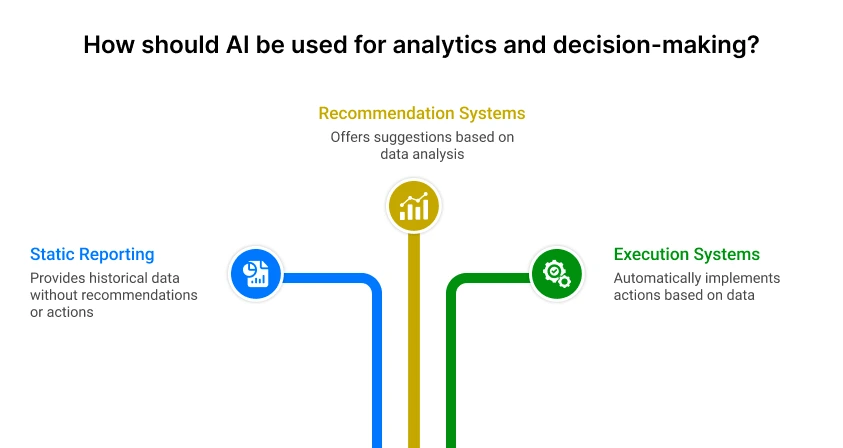
AI shifts analytics from static reporting to systems that recommend or execute actions. This changes how data is collected, evaluated, and used in production environments.
14.1. From Dashboards to Decision Engines
Conventional dashboards display historical data and require human interpretation, while decision engines use models to trigger actions automatically based on real-time inputs; platforms like Tableau and Power BI support reporting, but modern systems integrate with pipelines and models to automate responses such as recommendations, alerts, or dynamic pricing decisions.
14.2. Predictive vs Descriptive Insights
Descriptive analytics explains what has already happened using aggregated data, while predictive systems estimate future outcomes using models trained on historical patterns; predictive accuracy depends on data quality and model tuning, with practical targets often requiring consistent performance above 80–85% to support automated decision-making without manual review.
14.3. Business Impact & ROI
AI analytics delivers ROI when decisions are executed at scale and tied to measurable outcomes such as conversion rates, cost reduction, or operational efficiency; systems that process high-frequency data and automate responses can achieve 15–25% performance gains, while low-volume or manually reviewed workflows show limited impact, making ROI dependent on both data volume and execution speed.
Chapter 15: AI DevOps & Testing Tools
AI is changing DevOps services by automating testing, detecting failures earlier, and optimizing system performance in real time. This reduces manual effort but requires strict validation to avoid false positives and missed defects.
According to Google Cloud, teams using AI-driven operations tools can reduce incident resolution time by up to 30% through faster detection and automated diagnostics.
15.1. Automated Testing & Debugging
AI tools such as Testim and Snyk generate test cases, detect vulnerabilities, and identify code-level issues based on patterns rather than predefined rules; this allows faster coverage across edge cases and reduces manual testing effort, especially in continuous integration pipelines, but requires validation since AI-generated tests may miss context-specific logic or produce false confidence in coverage.
15.2. Monitoring & Performance Optimization
Monitoring tools like Datadog and New Relic use AI to detect anomalies, predict failures, and optimize system performance by analyzing logs, metrics, and traces in real time; this enables proactive issue resolution and performance tuning, particularly in distributed systems, but depends on accurate baseline configuration and sufficient data volume to avoid incorrect alerts.
15.3. Cost of Bugs vs Cost of Tools
| Factor | Cost of Bugs | Cost of AI Tools |
|---|---|---|
| Financial Impact | High (revenue loss, downtime) | Predictable (subscription-based) |
| Detection Time | Late (post-deployment) | Early (during development/testing) |
| Resolution Effort | High (hotfixes, patches) | Lower (preventive detection) |
| Risk Level | High (user impact, system failure) | Controlled (tool limitations manageable) |
| Best Scenario | Ignored or delayed testing | Continuous validation and monitoring |
Undetected bugs in production systems can lead to significant financial and operational impact, while investment in AI testing and monitoring tools provides controlled, predictable costs with faster detection and resolution cycles.
Chapter 16: AI Marketing & Content Tools
AI is now embedded across marketing workflows, from content creation to lead generation and campaign execution. This section is central because it directly connects AI adoption to revenue impact, brand control, and measurable ROI. The advantage is speed and scale. The risk is loss of consistency, accuracy, and trust if outputs are not controlled.
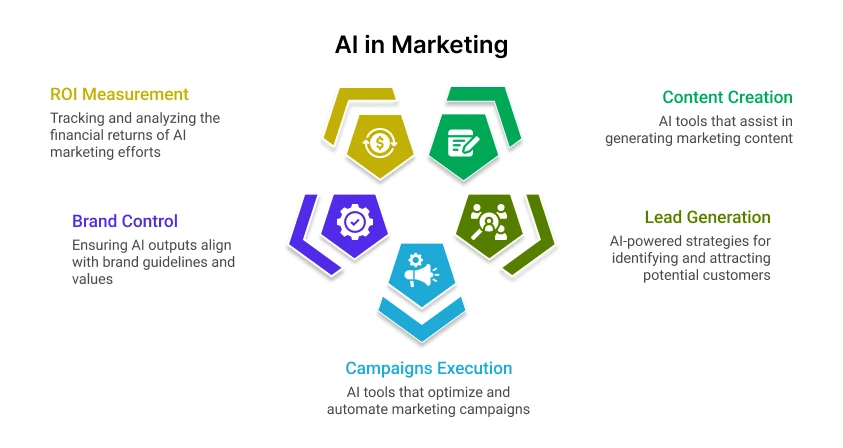
According to Salesforce, 84% of marketers report using AI in some form, with top gains in content production speed and campaign efficiency.
16.1. Content Generation vs Brand Risk
AI tools such asJasper andCopy.AI generate blogs, ads, emails, and social content in minutes, reducing production time by 40–60%; however, outputs often lack brand tone consistency, factual accuracy, and compliance alignment, which creates risk in regulated or high-visibility campaigns, making it necessary to enforce brand guidelines, approval workflows, and human review before publishing.
16.2. Lead Generation & Outreach
AI improves lead generation by automating segmentation, personalization, and outreach at scale; tools like HubSpot and Apollo.io use data signals to identify prospects, generate targeted messaging, and automate follow-ups, increasing response rates while reducing manual effort, especially in high-volume outbound campaigns.
16.3. ROI in Marketing Automation
AI-driven marketing delivers ROI when automation is applied to high-frequency tasks such as email campaigns, ad optimization, and content distribution; teams typically see 20–30% improvement in conversion rates and reduced cost per acquisition when workflows are automated and continuously optimized, while low-volume or poorly targeted campaigns show limited returns, making ROI dependent on data quality, execution scale, and continuous performance tracking.
16.4. Expected ROI Timelines
ROI in early-stage products depends on how quickly you validate demand and reach consistent user activity, not on feature completeness. Most startups should plan ROI in phases rather than expecting immediate returns.
- 0-30 days (Validation Phase): Launch MVP, acquire first 50–200 users, and measure engagement (e.g., ≥20–30% repeat usage). ROI is not financial at this stage; success is defined by signal quality, such as retention and user feedback.
- 30–90 days (Initial Traction): Optimize core flow based on usage data. Target early revenue or conversions, even if small (e.g., first ₹10K-₹1L in revenue or 5–10% conversion rate). If no traction appears, pivot or stop.
- 3-6 months (Growth Validation): Scale acquisition channels and improve unit economics. Aim for stable growth (e.g., 10–20% month-over-month user increase) and clearer cost vs revenue visibility.
- 6-12 months (ROI Realization): Achieve predictable revenue streams and positive contribution margins. At this stage, infrastructure and tooling costs should be justified by consistent revenue or measurable business outcomes.
Teams that delay validation beyond 60–90 days typically increase burn without improving success probability. Fast feedback cycles drive earlier ROI decisions and reduce unnecessary development spend.
Chapter 17: IT Agencies
AI is changing how IT agencies deliver projects and structure revenue. Margins now depend on delivery speed, automation, and reusable solutions rather than team size alone.
17.1. Deliver Faster, Increase Margins
AI tools reduce development time by automating coding, testing, and documentation, allowing agencies to deliver faster with the same team size. Agencies offering AI app development services can cut turnaround time by 30–50%, improving margins and increasing project capacity without proportional hiring.
17.2. Reducing Team Dependency
AI reduces reliance on large teams by enabling smaller groups to handle more work. Developers shift from manual execution to validation and system control. This allows agencies to scale output while keeping operational costs stable.
17.3. Offering AI as a Service
Agencies are packaging solutions such as chatbots, automation pipelines, and analytics into reusable offerings. By integrating generative AI for app development, they move from one-time projects to recurring revenue models. Some India-based firms, including players like NetSet Software, apply this approach to deliver faster and maintain flexibility across clients.
17.4. Client Communication & Positioning
Agencies must clearly communicate outcomes such as faster delivery, cost savings, and efficiency gains. Clients expect clarity on where AI is used and where human oversight remains. Strong positioning improves trust and supports premium pricing.
Chapter 18: Existing Businesses & Enterprises
Enterprise AI adoption does not start from scratch. It must work within existing legacy systems, fragmented data, and established workflows. The core challenge is integrating AI into the current infrastructure without disrupting operations, while ensuring measurable business outcomes.
According to Accenture, companies that scale AI effectively can increase profitability by up to 38%, but only when integration aligns with core processes.
18.1. AI Integration into Legacy Systems
AI integration in enterprises requires building API layers, data pipelines, and middleware to connect legacy systems with modern AI services; most implementations fall in the range of $50,000–$300,000 per integration layer, depending on system complexity, especially when working with on-premise infrastructure or tightly coupled architectures, making phased integration through APIs and microservices more practical than full system replacement.
18.2. Automation vs Transformation
| Factor | Automation | Transformation |
|---|---|---|
| Scope | Task-level improvements | End-to-end system redesign |
| Cost | $10K–$50K | $100K–$500K+ |
| Timeline | 2–6 weeks | 3–9 months |
| Impact | Efficiency gains | Business model shift |
| Risk | Low | High |
Automation improves existing workflows, while transformation rebuilds how systems operate using AI-driven decision layers.
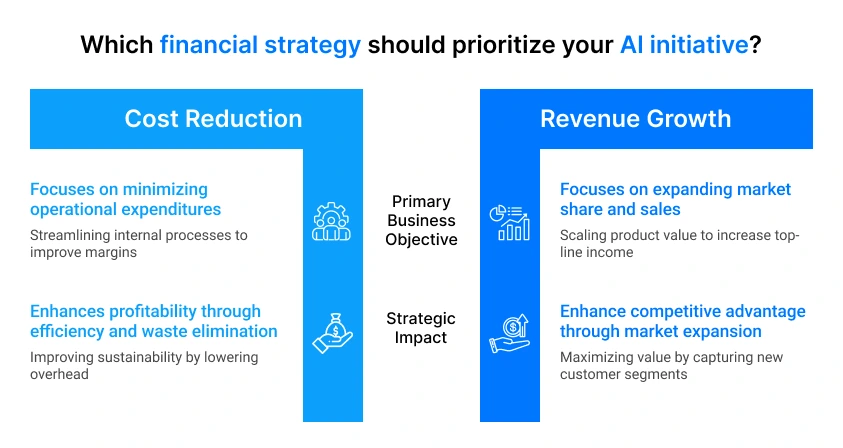
18.3. Cost Reduction vs Revenue Growth
| Factor | Cost Reduction | Revenue Growth |
|---|---|---|
| Focus | Lower operational cost | New revenue streams |
| ROI Timeline | 3–6 months | 6–18 months |
| Investment | $20K–$100K | $100K–$500K+ |
| Example | Process automation | Personalization, pricing models |
| Risk | Lower | Higher |
Enterprises typically begin with cost reduction before expanding into revenue-generating AI systems.
18.4. Change Management Challenge
The primary barrier to AI adoption is organizational change, not technology; teams must adapt to new workflows, trust AI-assisted decisions, and align with updated processes, which often adds 10-25% additional cost to the overall implementation, but is necessary to ensure adoption, system stability, and long-term return on investment.
Chapter 19: Understanding the True Cost of AI
AI implementation costs extend beyond model access or tool subscriptions. The total cost includes ongoing usage, system integration, and the effort required to adapt teams and workflows. Without a clear breakdown, organizations often underestimate long-term spend.
19.1. Subscription Costs
AI tools are typically priced on a subscription or usage basis, which varies depending on scale and model complexity; small teams may spend $20–$200 per month per tool for platforms like ChatGPT or Jasper, while API-based usage (e.g., language models or image generation) can range from $0.002 to $0.02 per request, scaling to $1,000–$10,000+ per month for production systems with high traffic, making cost directly dependent on usage volume and request frequency.
19.2. Integration & Maintenance
Initial integration involves connecting AI systems with existing infrastructure, which includes API development, data pipelines, and testing; typical integration costs range from $25,000 to $150,000, depending on system complexity, while ongoing maintenance, including monitoring, updates, and performance tuning, adds 15–25% of initial cost annually, especially in systems that require continuous optimization or operate in cloud environments.
19.3. Training & Team Adaptation
AI adoption requires teams to learn new workflows, tools, and validation processes; training costs can range from $5,000 to $30,000 per team, depending on size and expertise level, while productivity dips of 10-20% in the first 1-2 months are common as teams adjust to new systems, making training and adaptation a necessary investment to ensure effective long-term usage and prevent operational inefficiencies.
Chapter 20: ROI Frameworks
AI ROI must be calculated as an execution metric, not a theoretical estimate. Most teams miscalculate returns because they isolate cost savings and ignore time efficiency and revenue impact. A usable framework combines all three and converts them into measurable financial value tied to real system usage.
20.1. Simple ROI Formula
The baseline formula is:
(Time Saved + Cost Reduced + Revenue Gain) / Total Cost
This works only when each variable is quantified in monetary terms. Time saved must be converted into cost using actual hourly rates. For example, if a team saves 200 hours per month at ₹1,000 per hour, that equals ₹2,00,000 in value. Cost reduction includes direct savings such as reduced manual operations or tool consolidation. Revenue gain reflects measurable increases from improved conversions, pricing, or throughput.
In a practical scenario, if time savings generate ₹2,00,000, cost reduction adds ₹1,50,000, and revenue gain contributes ₹3,00,000, against a total AI cost of ₹2,00,000 per month, the ROI is 3.25x. In most production environments, anything below 1.5x indicates that the system is not optimized or the use case is weak.
20.2. Advanced ROI Models
As systems scale, ROI must account for operational variables that impact real returns. Unit economics becomes critical, where the cost per AI request is compared directly to the value generated per request. For example, if a system costs ₹2 per execution but generates ₹10 in value, it operates at a 5x margin. However, this margin is influenced by the adoption rate. If only 30–40% of users interact with the AI-driven feature, overall ROI drops significantly.
Error rates also affect returns. A 5% failure or incorrect output rate can reduce effective ROI by 10–15% due to rework, corrections, or user dissatisfaction. In addition, infrastructure costs increase with scale. Many systems experience 2–4x cost growth once usage expands, especially in API-driven architectures. Because of these variables, advanced ROI should be evaluated over a 6–12 month period rather than short-term cycles.
20.3.Time-to-Value Benchmark
Time-to-value defines how quickly an AI system begins to produce measurable outcomes. In the first 30 days, most systems show only operational signals such as time savings or workflow improvements. Between 30 and 90 days, cost reductions become visible and early revenue impact may appear, typically in the range of 5–10%.
From 3 to 6 months, systems stabilize and begin delivering consistent efficiency gains, often between 15–30%. By 6 to 12 months, full ROI is realized as both cost optimization and revenue contributions scale. If no measurable value appears within the first 90 days, the implementation is usually misaligned with business objectives or over-engineered beyond its actual use case.
A structured ROI framework ensures that AI investments are tied to outcomes, not assumptions. It enables faster decision-making, highlights underperforming systems early, and prevents unnecessary scaling without proven returns.
Chapter 21: When AI Saves Money vs Burns Cash
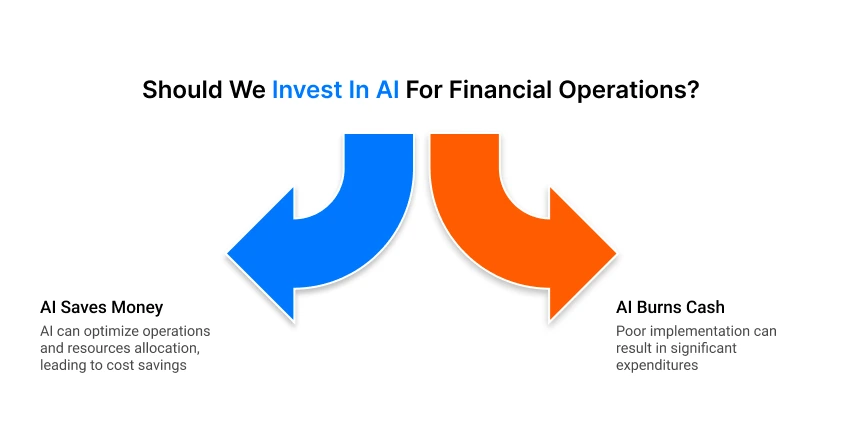
AI reduces cost only when it is applied to repeatable, high-volume workflows with measurable output. The same systems can also increase spending when usage is uncontrolled or tied to low-impact tasks.
21.1. High-ROI Use Cases
High-ROI use cases are defined by scale, consistency, and clear output value. Automating customer support, document processing, or internal workflows can replace thousands of manual actions per day; for example, handling 1,000 support queries daily at ₹20 per interaction can translate into ₹6,00,000+ monthly savings. These systems work because both input volume and outcome are predictable, allowing cost to be directly offset by efficiency gains or revenue contribution.
21.2. Low-Value Implementations
Low-value implementations typically involve experimental features, low-frequency tasks, or unclear business outcomes. AI systems deployed without defined metrics often generate continuous API and infrastructure costs without meaningful usage. A common issue is building features that users do not adopt, where even a ₹50,000–₹2,00,000 monthly spend fails to produce measurable returns, turning AI into a cost center instead of a value driver.
21.3. Cost Control Strategies
Cost control requires strict monitoring and alignment with business impact. This includes setting per-request cost limits, tracking usage patterns, and enforcing performance thresholds; systems should be optimized to reduce unnecessary calls and improve output accuracy. In practice, AI saves money only when it replaces scalable manual work or drives revenue; it leads to ongoing operational expense without justification.
Chapter 22: Choosing the Right AI Tool
Selecting an AI tool should start with a defined business problem, not feature comparison. Most failures occur when teams adopt tools based on popularity rather than fit. The right selection process ties capability to outcome, cost to usage, and performance to measurable impact.
22.1. Problem-First Decision Model
Start by clearly defining the problem before selecting any AI tool. Identify the exact task, expected output, input type, and success metrics such as accuracy, latency, or cost per operation. Also define constraints like data sensitivity, scale, and integration needs. This ensures tool selection is driven by requirements, not features, reducing unnecessary cost, complexity, and implementation delays.
22.2. Tool Evaluation Criteria
Tool evaluation must move beyond feature comparison and focus on how the system performs under real operating conditions. The goal is to ensure the tool fits your workflow, scales with usage, and maintains reliability without hidden costs. Tools like GitHub Copilot, Datadog, and Snyk are widely used across development and operations workflows, but each must be evaluated based on execution context rather than general capability.
- Accuracy in real scenarios: Test outputs using real inputs and edge cases. For example, tools like ChatGPT or Cursor may perform well in demos but require validation under production conditions.
- Latency and response stability: Measure response time and consistency, especially for real-time systems where delays impact user experience.
- Integration capability Evaluate API reliability and compatibility with existing systems. Tools like Zapier and Make simplify integration but may have limits in complex workflows.
- Cost structure at scale Analyze pricing based on projected usage. Many AI tools show a 2–3x cost increase as request volume grows, especially in API-based models.
Security and operational reliability are equally critical, particularly for production systems handling sensitive data.
- Security and compliance Tools like Snyk help detect vulnerabilities and enforce secure coding practices in real time.
- Vendor reliability Assess uptime, support, and long-term stability. Platforms such as Datadog provide reliability through monitoring and alerting systems.
- Control and customization Ensure the tool allows tuning, constraints, and monitoring. Advanced tools like GitHub Copilot now support multi-step workflows and agent-based execution, increasing control over outputs.
A tool that meets these criteria is more likely to perform reliably in production without unexpected cost spikes or operational issues.
Chapter 23: Pre-Adoption Checklist
AI should be adopted only when it solves a clearly measurable problem. Many implementations fail because AI is introduced where simpler systems would be more stable, cheaper, and easier to maintain. This checklist helps validate whether adoption is actually justified.
23.1. Do You Really Need AI?
Start by checking if the problem truly needs AI. If inputs are structured and rules are fixed, traditional logic-based systems are usually more reliable. AI is useful when dealing with unstructured data, inconsistent patterns, or high variability at scale. Define measurable outcomes such as improved speed, accuracy, or revenue. If these improvements cannot be quantified, AI adoption is not justified.
23.2. Simpler Alternatives
Before using AI, evaluate non-AI solutions like rule-based workflows or automation platforms such as Zapier and Make. These tools can handle many operational tasks without model complexity or unpredictable behavior. In structured workflows, they often deliver most of the required outcome at lower cost and with higher consistency, especially for repetitive processes.
23.3. Risk Assessment
AI introduces operational and financial risks that must be reviewed before deployment. These include incorrect outputs, data exposure, dependency on external vendors, and fluctuating usage costs. Systems should define clear error tolerance levels and expected failure scenarios in advance.
Security requirements such as encryption, access control, and compliance checks must be validated before production use. Cost behavior should also be tested under peak load conditions to avoid unexpected scaling expenses. A structured risk review ensures AI adoption remains controlled, practical, and aligned with business objectives.
Chapter 24: Build vs Integrate vs Ignore
Choosing whether to build an AI system, integrate an existing tool, or ignore a use case determines long-term cost, complexity, and system stability. Many teams fail because they default to building or adopting tools without evaluating necessity or maintenance impact.
24.1. Decision Trees for Businesses
Decision-making should follow a structured evaluation path. If the requirement is core to the product and requires deep customization, building may be justified. If the functionality is standardized and available through stable platforms, integration is usually more efficient. If the task does not directly impact revenue, user experience, or operational efficiency, it should be ignored. Tools like OpenAI API or AWS Bedrock are often preferred for integration because they reduce infrastructure burden while maintaining flexibility.
24.2. Avoiding Tool Overload
Tool overload occurs when multiple overlapping AI systems are introduced without clear ownership or purpose. This leads to fragmented workflows, higher maintenance effort, and inconsistent outputs. Each new tool adds integration overhead, monitoring requirements, and cost exposure. In practice, systems with more than 5–7 AI tools often experience reduced efficiency due to duplication of functionality and increased coordination complexity. The goal is to consolidate capabilities rather than expand tool count.
24.3. Minimal AI Stack Strategy
A minimal AI stack focuses on using only essential components required to support business outcomes. This typically includes one model provider, one orchestration layer, and one monitoring system. For example, combining an API-based model, a workflow tool, and a logging system can cover most production needs without unnecessary complexity. The strategy reduces cost, improves reliability, and simplifies scaling decisions while keeping system architecture manageable over time.
Chapter 25: 30-Day AI Adoption Plan
This plan is designed for direct execution. The objective is not exploration, but measurable validation of AI in real workflows. By the end of 30 days, each use case should clearly fall into scale, refine, or stop.
25.1. Identifying Opportunities (Days 1–5)
Start by selecting real operational workflows, not theoretical ideas. Focus on repetitive tasks that already consume time daily, such as support replies, reporting, content drafting, or internal coordination.
Limit selection to 2–3 workflows only. For each one, record a baseline using simple metrics: time per task, cost per task, and frequency per week. If a workflow cannot be measured, it should not be included.
By Day 5, you must have a workflow sheet with:
- Task name.
- Current manual time.
- Weekly volume.
- Expected improvement target.
25.2. Testing Tools (Days 6–20)
Select tools based on task type. Use ChatGPT for generation tasks and Zapier for workflow automation.
Do not integrate into production systems yet. Run controlled tests using 50–100 real samples per workflow. Compare manual output vs AI output using three fixed metrics: time taken, accuracy, and rework rate.
Keep scope stable. Adjust prompts or workflow rules only if results are inconsistent.
By Day 20, you should produce a test comparison report showing:
- Average time saved (%).
- Accuracy difference.
- Failure or correction rate.
25.3. Measuring Early Results (Days 21–30)
This phase converts testing into decision-making. Measure real-world impact using actual usage, not test assumptions. Focus on time saved per task, cost reduction, and output consistency.
A strong signal for continuation is 20–30% efficiency improvement with stable accuracy. Another key indicator is adoption rate; if users actively avoid the AI workflow or switch back to manual processes, the implementation is not aligned with real needs.
By Day 30, every workflow must be categorized:
- Scale → consistent gains, stable adoption.
- Refine → partial benefit but unstable output.
- Stop → no measurable improvement or low usage.
This structure ensures AI adoption is driven by real operational data. It prevents long-term investment in weak use cases and forces clear, measurable decision-making within a fixed timeframe.
Chapter 26: 90-Day Transformation Plan
This phase moves AI from controlled testing into production workflows. The objective is stable integration, controlled scaling, and measurable business impact. Only workflows that already showed value in earlier testing should enter this phase.
A workflow qualifies for this phase only if it has demonstrated at least 20% efficiency improvement or consistent accuracy above baseline performance during the 30-day plan. Without this, integration will create operational noise instead of value.
26.1. Integration into Workflows (Days 1–30)
The first 30 days focus on embedding AI into live business processes. This means connecting validated use cases directly into operational systems such as support desks, reporting pipelines, or internal automation flows.
Use ChatGPT for generation-heavy tasks and Zapier for workflow orchestration. At this stage, AI should become the default execution path, while manual fallback remains active for error handling.
Each workflow must run in real conditions with real users. Any drop in performance below acceptable thresholds should trigger immediate rollback to manual processing until fixes are applied.
26.2. Optimization & Scaling (Days 31–60)
Once workflows stabilize, focus shifts to performance tuning and controlled expansion. Optimization includes reducing latency, improving accuracy, and minimizing unnecessary API calls or redundant steps.
Scaling should only begin when systems maintain stable performance under initial load. Expansion must be gradual, starting from a small team or department before full rollout. A safe scaling trigger is consistent with a 25–30% efficiency gain with stable error rates under increased usage.
If performance degrades during scaling, expansion must pause until system stability is restored.
26.3. Performance Tracking (Days 61–90)
The final phase establishes continuous monitoring and accountability. Every AI-enabled workflow must track core metrics: time saved, cost per operation, accuracy rate, and user adoption.
Ownership should be clearly assigned to a responsible operator or team to ensure ongoing monitoring and issue resolution. Without ownership, performance decay typically goes unnoticed until cost increases.
By Day 90, each workflow should be classified into one of three outcomes:
- Fully integrated into core operations.
- Requires further optimization before scaling.
- Removed due to insufficient value or instability.
This phase ensures AI transitions from experimentation to controlled production use. It also enforces rollback capability, preventing unstable workflows from impacting business operations while enabling only proven systems to scale further.
Chapter 27: Building an AI-Ready Team
AI adoption depends on how well teams are structured around execution, validation, and continuous improvement. A strong AI-ready team is not defined by size but by clarity of roles, measurable output, and the ability to work with AI systems in daily operations.
27.1. Required Skillsets
An effective team combines technical, analytical, and operational capabilities. Developers must understand API integration, data flow, and system reliability. Product members should define measurable outcomes instead of feature lists. Analysts must evaluate AI outputs using accuracy, consistency, and business impact rather than raw data reporting.
Hands-on familiarity with tools like ChatGPT for generation tasks and Zapier for workflow automation is now a baseline requirement, as these tools directly influence production workflows.
27.2. Roles & Responsibilities
A minimal AI-ready team typically includes one product owner, two engineers, one analyst, and one operations member. Developers handle integration and system stability, product owners define use cases and success metrics, analysts monitor accuracy and performance trends, and operations teams manage deployment and monitoring.
The key shift is the responsibility transition from execution to supervision. Humans no longer perform every step manually but ensure AI systems operate within defined boundaries and expected outcomes.
27.3. Training Strategy
Training should be practical and workflow-based, not theoretical. A structured approach improves adoption speed and reduces resistance.
- Foundation phase (Week 1–2): Introduction to AI tools, limitations, and internal use cases
- Execution phase (Week 3–6): Role-based training using real workflows and live tasks
- Operational phase (Week 7–12): AI usage in production with feedback loops and performance tracking
A pilot team model should be used, where a small group runs live AI workflows for 30–45 days and creates internal documentation for scaling across departments.
Team readiness can be measured using a simple score: adoption rate of AI tools, reduction in manual workload, and improvement in output accuracy. A team is considered AI-ready when it consistently shows at least 25–30% efficiency improvement with stable output quality across workflows.
Chapter 28: Measuring Success
Success in AI systems is measured through real operational impact, not usage or deployment alone. The focus is on efficiency, cost, and output quality.
28.1. KPIs That Matter
Track time saved per task, error rate, cost per operation, and adoption level. These metrics show whether AI is improving workflow speed and accuracy. Throughput improvement is also important to measure how much more work is completed with the same resources.
28.2. Tracking ROI
ROI is calculated by comparing the total AI cost with gains from time savings, cost reduction, and revenue impact. A healthy system should show at least 20–30% efficiency improvement within 60–90 days. If results stay flat beyond this, the use case needs adjustment or removal.
28.3. Continuous Improvement
AI systems must be updated regularly. Monitor performance, refine workflows, and remove inefficient steps. Weekly feedback helps identify issues early. Continuous improvement ensures stable performance, controlled costs, and long-term value from AI adoption.
Chapter 29: Where AI Fails Today?
AI systems are strong in pattern recognition and structured tasks, but they still fail in areas that require deep understanding of context, uncertainty handling, and human judgment. These limitations are important because they directly affect reliability in production environments.
29.1. Limitations in Accuracy
AI accuracy drops when inputs are ambiguous, incomplete, or highly domain-specific. Even advanced models like ChatGPT can produce confident but incorrect outputs, especially in edge cases or low-context queries. In real systems, this leads to rework, validation overhead, and occasional operational errors. Accuracy is also inconsistent across tasks, meaning performance cannot be assumed stable without continuous testing and monitoring.
29.2. Context & Judgment Gaps
AI lacks true situational understanding. It processes patterns, not intent, which creates gaps in decision-making scenarios that require business judgment or ethical reasoning. For example, it may optimize for efficiency while ignoring strategic constraints or long-term impact. In workflows involving customer escalation, compliance decisions, or financial approvals, human oversight remains necessary because AI cannot reliably evaluate context beyond its training patterns.
Chapter 30: Operational Risks
30.1. Overdependence on Tools
Overreliance on AI tools creates system fragility. When workflows depend heavily on platforms like ChatGPT or external APIs, any downtime, rate limit issues, or model failure can interrupt core operations. This leads to stalled processes, delayed outputs, and reduced team control over execution. A safe setup always includes fallback logic or manual override paths for critical workflows.
30.2. Security & Data Risks
AI systems often process sensitive business data, which increases exposure to leaks, misuse, or unauthorized access if not properly controlled. Risks usually arise from weak API configurations, poor access management, or unverified third-party integrations. To reduce exposure, systems must enforce encryption, role-based access, and strict data handling policies. Continuous monitoring is required to detect abnormal usage patterns and prevent data compromise in production environments.
Chapter 31: Quality vs Speed Tradeoff
AI improves execution speed, but without control, it can reduce output reliability. The key is balancing fast generation with structured validation so performance gains do not create downstream rework.
31.1. Maintaining Standards
Tools like ChatGPT can generate outputs quickly, but production use requires fixed rules for format, tone, and correctness. Teams should define acceptance criteria before deployment, including error tolerance, review steps, and output structure. This ensures speed does not override consistency.
31.2. Avoiding Low-Quality Output
Low-quality results appear when outputs are used directly without checks. This increases correction cycles and reduces trust in automation. Regular sampling, review layers, and prompt refinement help stabilize output quality, especially in high-volume workflows.
| Factor | Speed-First | Controlled Quality |
|---|---|---|
| Output Time | Very fast | Moderately fast |
| Accuracy | Inconsistent | Stable |
| Rework | High | Low |
| Usage Type | Draft tasks | Production tasks |
Chapter 32: Long-Term Sustainability
Long-term sustainability ensures AI systems remain stable as tools evolve, vendors change policies, and usage scales. Many systems work initially but fail due to dependency and cost pressure over time.
32.1. Tool Longevity
AI tools change frequently in models, pricing, and performance. Platforms like ChatGPT may update behavior or limits, which can affect production workflows. To manage this, systems should be modular, so individual components can be replaced without rewriting the full setup.
32.2. Vendor Dependency
Relying on a single provider creates risk if pricing or APIs change. This can disrupt operations or increase costs suddenly. Using abstraction layers and flexible integrations reduces dependency and allows switching providers with minimal changes.
32.3. System Scalability
Scalability ensures systems handle increased usage without failure or cost spikes.
- Cost per request should stay predictable as usage grows
- Performance should remain stable under higher load
- Architecture must support scaling without redesign
Sustainable systems are designed to grow without breaking or becoming expensive.
Frequently Asked Questions (FAQs)
1. How can businesses start using AI without wasting money on unnecessary tools?
Businesses should begin by identifying operational challenges, repetitive tasks, and measurable goals before selecting AI tools. A problem-first adoption strategy helps avoid unnecessary subscriptions, reduces implementation risks, and improves long-term return on investment from AI initiatives.
2. What are the biggest mistakes companies make when adopting AI tools?
Many companies adopt AI tools without clear objectives, workflow planning, or team readiness. This often creates poor integration, rising costs, low productivity gains, and dependence on tools that fail to solve meaningful business problems effectively.
3. Is AI-generated code reliable for software development projects?
AI-generated code can accelerate MVP development, debugging, and repetitive programming tasks, but it still requires experienced developers for architecture decisions, security validation, scalability planning, testing, and maintaining production-level software quality standards consistently.
4. What is the difference between AI-augmented systems and AI-native applications?
AI-augmented systems enhance existing workflows using artificial intelligence features, while AI-native applications are fundamentally designed around AI-driven operations, automation, decision-making, and adaptive learning capabilities from the beginning of product development and deployment.
5. How do businesses measure ROI from AI implementation and automation?
Businesses measure AI ROI by tracking productivity improvements, operational cost reduction, faster delivery cycles, customer experience enhancement, revenue growth, and time-to-value benchmarks against implementation, maintenance, training, and infrastructure investment costs over time.