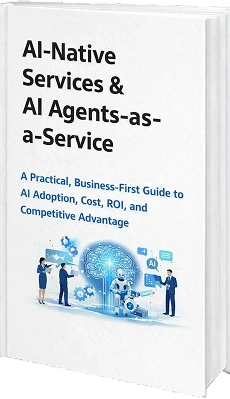
A Practical, Business-First Guide to AI Adoption, Cost, ROI, and Competitive Advantage
AI is already changing the way businesses do things, whether leaders agree with it or not. In most organizations, these changes occur silently, within the day-to-day operations.
However, when you are tied up with customers, teams, and day-to-day operations, you may not always be aware of what this means to you.
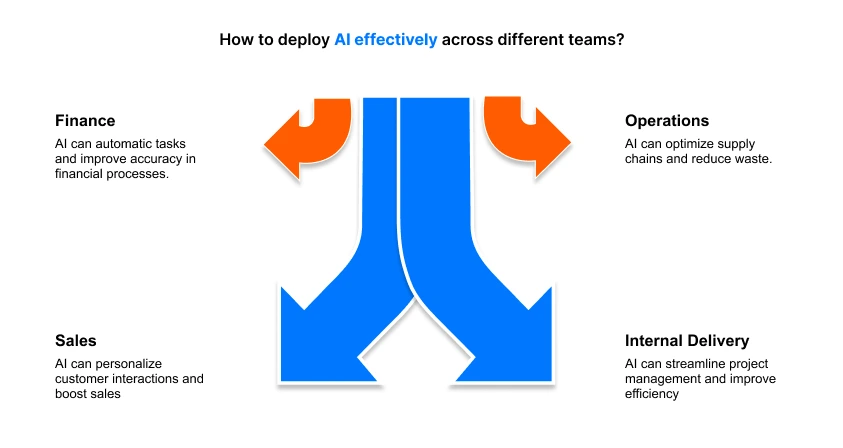
This perspective here comes from deploying AI inside finance, operations, sales, and internal delivery teams, where processes are fragmented, and the decisions are not often clear.
1. Why This Guide Exists (Read This First)
AI has progressed from something businesses experimented with to an expectation in most industries. Whether you run a small business, a startup, or you're the leader of a larger organization, AI is already making a practical impact in everyday ways when it comes to doing things for the first time.
External expectations are often more dynamic than internal reality. Investors, partners, or market pressure can compress timelines, while operations, systems, and teams struggle to scale at the same pace. As that gap grows, manual coordination becomes one of the biggest blockers to execution.
This is a guide for you to choose if one thinks oneself needs to run an AI pilot now, later, or not at all, and to be on the sine qua non of where it would truly be helpful versus where it would be adding more complexity. It also helps you to understand where AI - native services can play a role in the day-to-day services, and where still human ownership and judgment will be more important.
AI does not need to replace an entire system for it to be useful. In most cases, it is best used as an application on existing company data with clear guidance, and allows the AI agents to assist with the repeatable workflows and day-to-day tasks that currently rely heavily on the core team.
The questions that actually matter are:
- What role does AI play in your business today?
- What is the real cost of using AI, and what does it actually reduce?
- How do you start with a small, controlled pilot?
- What risks need to be addressed once limited responsibility is handed over to AI?
2. What is an Agentic AI?
Agentic AI is your digital assistant that will work in conjunction with your current systems. Rather than running everything, it runs with clear boundaries. It supports key processes, workflows, and flags issues early on, which can be addressed before they become a bigger issue.
For small businesses, this approach comes in handy as it gives you clarity and consistency in daily operations without adding people or tools to manage. An agentic AI is not a substitute for leadership and judgment. It is working with you and not for you. Routine decisions and coordination can be made automatically, and big decisions are brought to the surface for your consideration.
The result is more time to focus on growth, planning, and customers, while the behind-the-scenes operational work continues to carry on in a controlled and predictable way.
3. Understanding Agentic AI: How It Works for Your Business
Agentic AI works by operating directly inside your existing workflows rather than outside them. It does not wait for explicit instructions for every step. Instead, it looks at how work already flows through your business and finds opportunities where decisions are repeated, hand offs ordeal, and follow-ups rely on the availability of people. Once these patterns have been identified, actions are taken by the system within predefined boundaries to move on with work.
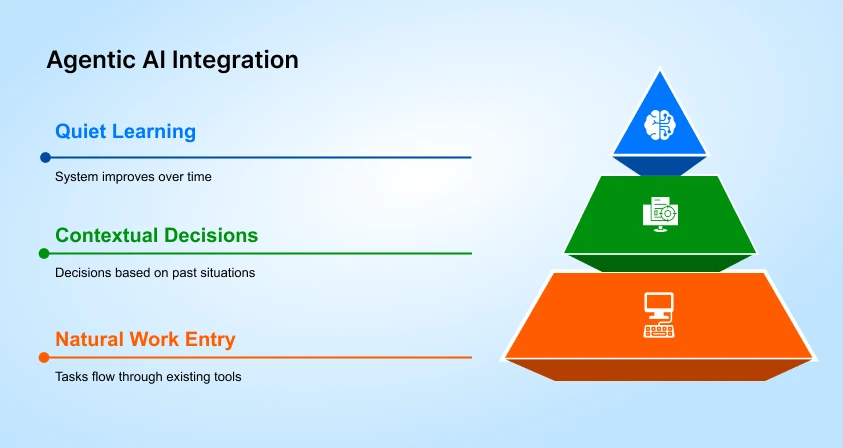
3.1. Work enters the system naturally
Tasks, requests, or updates flow through the tools your team already uses. The agentic AI reads the context using your business data, past actions, priorities, and current constraints.
3.2. Decisions are made in context, not in isolation
Instead of adhering to hard rules, the system analyzes what should occur next based on previous similar situations that it has encountered. It can assign work, go off reminders and updates, or flag problems without waiting for manual approval. As this continues, the system improves without disrupting daily operations.
3.3. Learning happens quietly over time
When the results are positive, these tendencies get strengthened. When something doesn’t work as expected, the agent changes the manner of reaction the next time it encounters a similar situation.
For your business, this means a change in the day-to-day feeling of work.
- Fewer tasks stall due to coordination gaps
- Fewer decisions depend on someone being available at the right moment.
- Only meaningful exceptions reach you or your leadership team.
The agent takes care of routine judgment call execution and keeps you in control of decisions involving direction, cost, or risk.
In simple terms, Agentic AI is the reduction of the invisible effort expended in work. Your team spends less time worrying about co-ordinating process and more time concerned with their customers, growth, and planning for the future, and the system handles operations in the background, keeping things moving smoothly and steadily.
4. What are the different types of AI Agents for Businesses?
The different kinds of AI agents that are employed in organizations are model-based reflex agents, utility-based agents, learning agents, goal-based agents, and hierarchical agents.
Each of these is designed to address a specific type of business issue, based on whether it is speed, optimization, learning, coordination, or goal-oriented decision-making. The following is a description of each of these and how they are actually employed in businesses.
4.1. Model-Based Reflex Agents
Model-based reflex agents act according to pre-set rules and based on the current situation. They observe their environment, keeping an internal simple state, and take an action according to predefined simple logic, and right away. Businesses employ these agents whenever they need fast and consistent responses and do not have to plan long-term.
Common business use cases:
- System monitoring
- Automatic responses
- Safety and compliance triggers
Example: In fleet organizations, it will automatically pause an order or alert a manager when stock levels drop below a fixed threshold.
4.2. Utility-Based Agents
Utility-based agents select actions based on which option provides the greatest outcome based on business priorities such as cost, revenue, speed, or engagement. They are used whenever the decisions involve trade-offs and businesses wish to get results optimized against measurable goals.
Common business use cases:
- Product recommendations
- Pricing decisions
- Marketing optimization
Example: An online store uses a utility-based agent to decide which products to promote based on conversion likelihood and customer behavior.
4.3. Learning Agents
Learning agents improve their decisions over time by analyzing feedback from past actions. They adapt automatically, reducing errors without constant manual updates. Businesses rely on learning agents where the same decisions occur repeatedly, and accuracy improves with experience.
Common business use cases:
- Email filtering
- Fraud detection
- Customer behavior analysis
Example: Email systems learn which messages are important as users interact with them, improving filtering accuracy over time.
4.4. Goal-Based Agents
Goal-based agents work backwards by having a goal and determining actions to get there.
If conditions change, they change the way they do things; they don't stop.'These agents are useful if environments are unpredictable or constraints change often. These agents are useful when environments are unpredictable or constraints change frequently.
Common business use cases:
Hierarchical agents allow organizations to scale operations without adding management overhead.
- Logistics planning
- Resource allocation
- Workflow optimization
Example: A logistics team uses a goal-based agent to reduce delivery delays by dynamically adjusting routes when disruptions occur.
4.5. Hierarchical Agents
Hierarchical agents are agents that are organized in layers, where the top-level agents handle the planning and coordination of the agents, while the lower-level agents handle the actual execution of specific tasks. They are usually used in environments with complex situations that involve multiple systems or teams.
Common business use cases:
- Manufacturing operations
- Large-scale service delivery
- Multi-system coordination
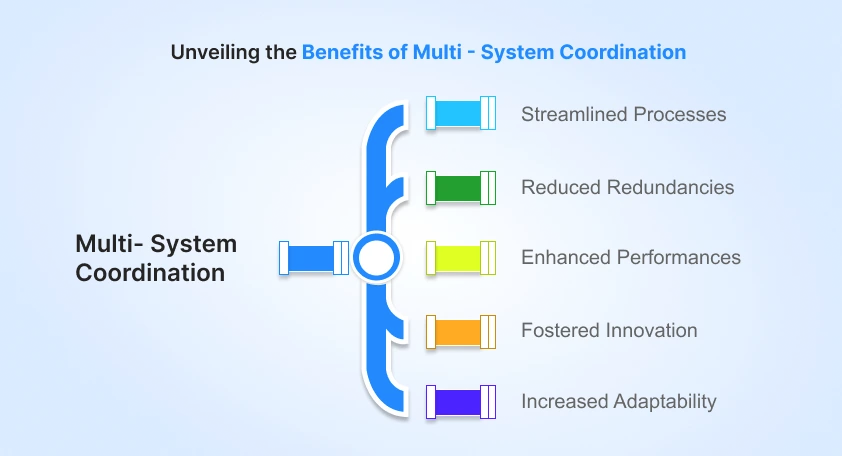
Example: On a production floor, one agent manages priorities while other agents monitor equipment, inventory, and quality.
4.6. How Businesses Choose the Right AI Agent?
Organizations choose AI agents depending on the nature of the problem they want to solve.
- Repetitive decisions: Learning agents
- Decisions with trade-offs: Utility-based or goal-based agents
- Complex coordination: Hierarchical agents
- Immediate responses: Model-based reflex agents
The right AI agent depends on where processes break down, not on how advanced the technology sounds.
| Agent Type | Best For | CEO/CFO Value | Risk Controlled |
|---|---|---|---|
| Model-Based Reflex | Automated alerts | Faster reaction | Reduced errors |
| Utility-Based | Outcome-driven decisions | Max ROI per action | Consistency |
| Learning Agents | Repetitive tasks | Time saved | Fewer mistakes |
| Hierarchical Agents | Multi-system ops | Scalable growth | Coordination errors |
| Goal-Based Agents | Complex trade-offs | Smarter decisions | Delays & bottlenecks |
5. The Quiet Shift Happening Inside Businesses
AI adoption rarely happens as a single, visible event. Most businesses start using it quietly, inside everyday workflows. One task gets automated, a report is delivered more quickly, a decision occurs without any manual intervention. At first, nothing appears different which is why many leaders don't perceive the shift until delays have mounted or costs have spiked or even worse, their competitors have begun moving faster.
This is not a futuristic experiment. For many businesses, AI has crept up on them and is now a part of how work actually gets done. Companies that adopt it with a firm understanding of the benefits aren't surfing the tidal wave of trends, but getting rid of friction from their operations and freeing up their teams to do things that are relevant and not coordination.
Businesses that delay embracing AI don't go out of business overnight, but inefficiency doesn't come for nothing. Tasks accumulate, costs begin to creep up and teams are stuck with manual work.
5.1. Why Is This Shift Hard to Notice?
Most of the improvements in AI are in the background. Little changes each day may not appear that different but they add up over weeks and months. Companies that take a beginning are available increased insights and better decision-making, which translates into more responsive operations and smoother increases.
5.2. Early Signs Your Competitors Are Ahead
You never see AI itself, but you feel the effect of AI. Some common signs are quicker responses to changing situations, with fewer sloppier operations, and spending more time on planning than solving repetitive problems. The differences through time can be summarised as:
| Business Area | With AI Embedded | Without AI |
|---|---|---|
| Execution Speed | Work flows steadily and accurately | Work gets stuck and prone to delays |
| Manual Work | Mostly automated | High manual dependency |
| Decisions | Timely and data-backed | Delayed, intuition-driven |
| Scaling | Grows efficiently without extra headcount | Limited by resources and capacity |
AI in this regard is not a tool or trend. It silently helps in running the business day by day, free of friction, and helps founders and teams focus on growth and strategy in business and customer interactions rather than firefighting. The change is incremental and often not visible in the short run, but it will have real consequences to businesses through taking actions early versus waiting.
6. The Wrong First Question Most Companies Ask About AI?
When most companies start thinking about AI, they begin with one question:
“Which AI tools and platforms will align with our company?”
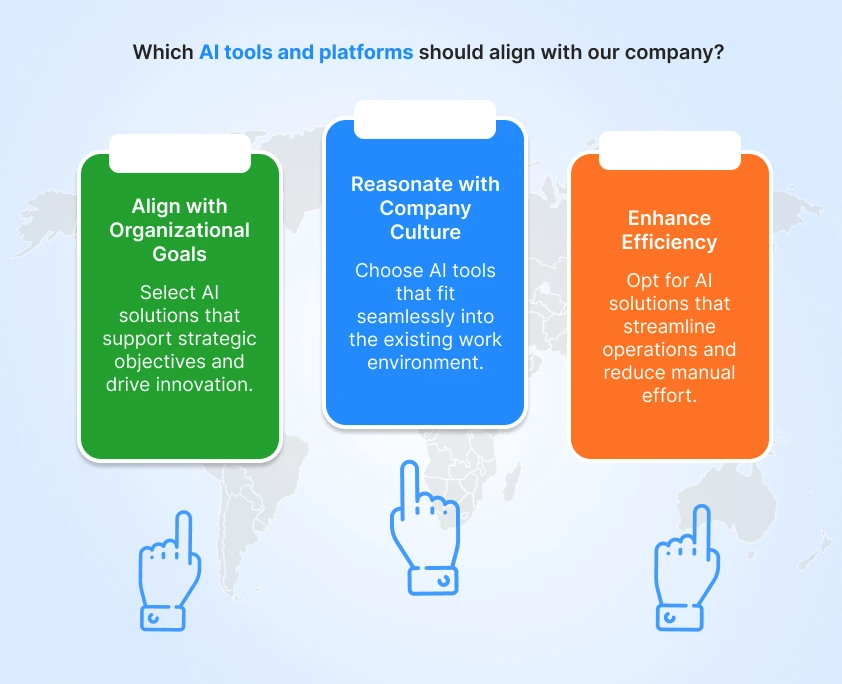
It makes sense to begin there, but it typically makes things more difficult. Many AI tools and platforms are available with demos, promises, and features. Yet they rarely explain which suits best for your business. A better way to start is by looking at where work repeatedly slows, breaks, or requires manual correction. Where do things slow down? Where do people keep doing the same task again and again?
Where do small delays become daily headaches? AI helps when it removes these problems. It doesn’t help when it just adds another tool to manage.
6.1. Where Does AI Value Usually Hide
Sometimes, companies that will benefit the most from AI have no clue what to do with them once they implement them in their business. This doesn’t mean companies don’t care. They simply don't know how to solve it. When people are getting the same problems everyday, they stop noticing the problems. It is because with teams experiencing the same problems over and over again, they over time, the problems become normal.
6.2. This usually happens because:
- Teams are very close to existing processes, so inefficiencies feel normal.
- Delays and errors are treated as small issues, not signals of deeper problems.
- Departments improve their own work without looking at the full flow.
- People start choosing tools instead of focusing on the results they want.
- When this happens, AI feels hard to place and even harder to justify.
This is where an external help, an AI-native, can help. Often, clarity alone creates momentum. Knowing where AI should help is more valuable than knowing what it can do.
6.3. What Being “AI Ready” Really Means?
Many leaders believe they are not ready for AI. In reality, they don't need to be ready. It is not about perfect data or having an AI team in the business.
Most businesses are ready if they have:
- Defined workflows, even if they are imperfect
- Access to basic operational data
- Leadership support for testing and learning
- A genuine willingness to improve processes, not just automate them
- Success begins with the proper plan and the correct mindset no matter the systems and technical skills.
That’s why the right first question is not “Which AI tool should we use?” It’s “Where does our business struggle every day?”
Once that answer is clear, the path forward becomes far easier to see.
7. Where AI Typically Creates Its First Business Impact?
When the companies and businesses started using AI solutions, it didn’t usually start with the big, difficult tasks. It started by creating space in the company by doing small tasks, day-to-day repetitive tasks. These are the areas where businesses feel the impact almost immediately.
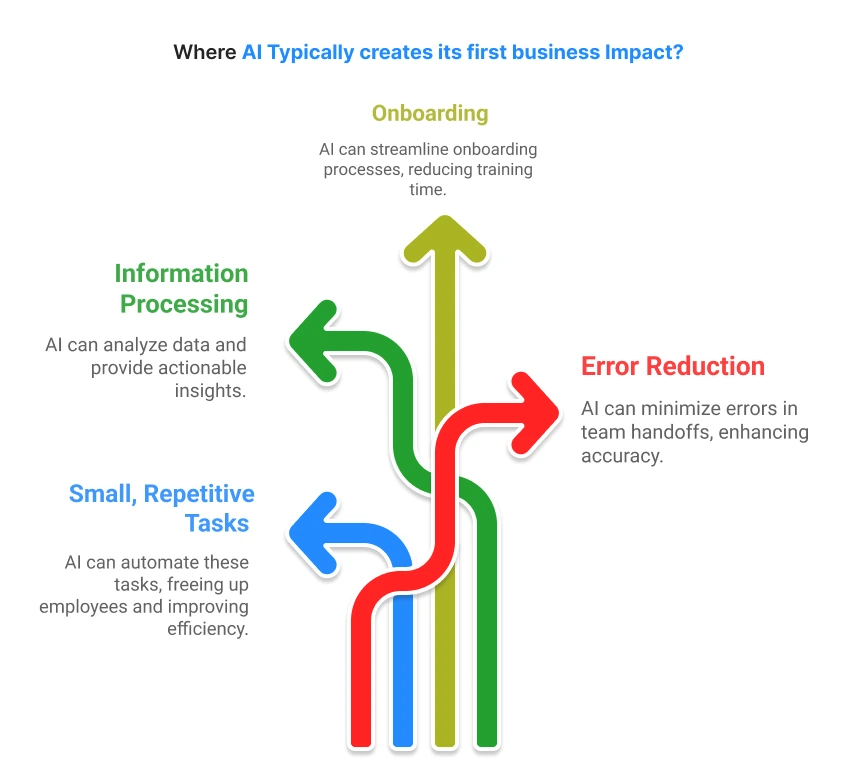
7.1. Team members are free from Repetitive Work
All SMBs and companies have tasks that nobody would desire to repeat once more, such as filling spreadsheets, responding to and following up on e-mails, or generating daily reports. AI can assume all these repetitive functions; it can accomplish them in minutes that took hours.
This effect is not only speed-related, but it is also accurate and consistent, and allows team members to concentrate on valuable work. A finance department that used to take hours to match invoices is now able to work on insights rather than typing in the data.
7.2. Turning Information Into Action
It is not data that makes things happen. Teams consume a lot of time in transferring information compared to decision-making. AI examines the data reveal patterns, and provides relevant information to the right individuals at the right moment.
For example, sales teams will instantly find which of the leads and the higher chance of conversion.
7.3. Quicker Onboarding Without Extra Training
When new people join a team, productivity usually drops before it improves. Not because they are slow, but because they don’t yet know where things live or how work usually moves.
AI helps by answering simple, practical questions as they come up. New team members don’t need to interrupt others or wait for explanations. They can find context while working.This reduces dependency on senior staff and shortens the time it takes for someone to become useful.
7.4. Fewer Errors in Handoffs Between Teams
Many business issues appear when work moves from one team to another. Details get lost, assumptions change, and responsibility becomes unclear. AI helps by carrying context forward. Notes, decisions, and next steps move with the task instead of staying in someone’s inbox or head. This makes transitions cleaner and reduces the back-and-forth that usually follows cross-team work.
8. Why do many AI Projects Fail Before Showing Real Results?
A project doesn’t fail because the idea is bad. It fails when the first steps are confusing or rushed. Here’s why this happens, and how to avoid it.
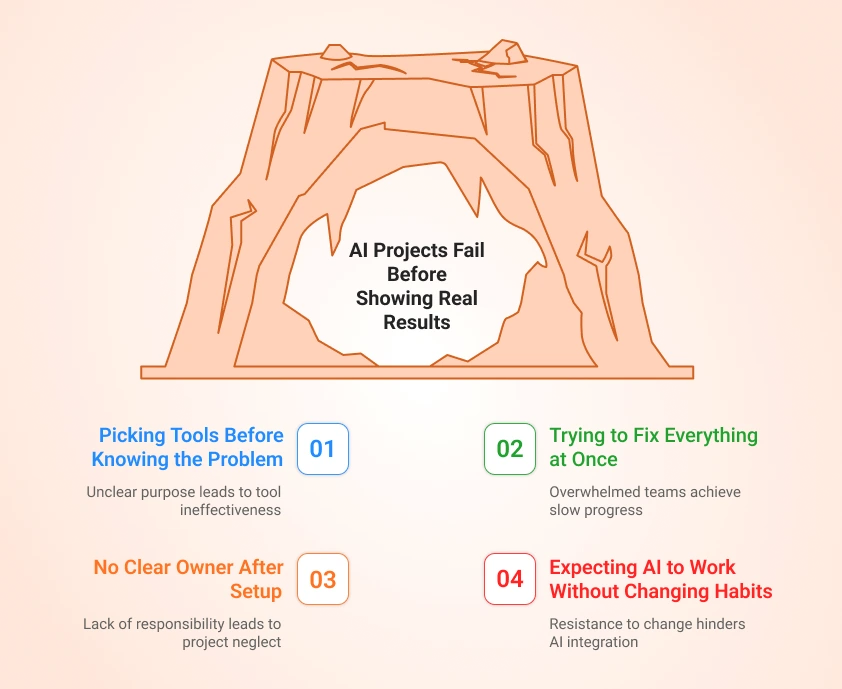
8.1. Picking Tools Before Knowing the Problem
A common trap is choosing a platform first. Popular platforms like Zapier, Microsoft Power Automate, and UiPath seem to be useful for some team members, but they aren’t. The demos look amazing. But if you don’t have clarity on what to use them for, the tool doesn’t help.
For example, a team spent 2–3 months testing UiPath to automate work, but they hadn’t determined which process actually needed automation.
The result? Work still took the same time, and the team felt stuck.
The smarter approach: start with one real problem. Ask yourself, what task takes too much time or causes frustration? Then pick the tool that solves it.
8.2. Trying to Fix Everything at Once
Additionally, teams often have unrealistic expectations regarding task automation. Teams often try to automate several processes (in bulk) using numerous tools (e.g., Zapier, Airtable, and Power Automate) together/configured at the same time.
The result is predictable:
- Confusion over which tool to use
- Slow progress across all projects
- No clear results
This could be accomplished through the use of Power Automate to reduce invoice processing time from 4 hours to 30 minutes.
Then you simply repeat this process, gaining confidence through accumulating many successes.
The Real Lesson
Projects don’t fail because the idea is bad; they fail when the basics are skipped, so start small, fix one real problem, make it work with everyday tasks, and give someone clear responsibility to make it happen.
8.3. No Clear Owner After the First Setup
Many AI projects start with excitement but fade once the initial setup is done. The problem is not the system. It’s ownership. After launch, no one is clearly responsible for checking results, fixing small issues, or deciding what should improve next. The project sits in between IT, operations, and leadership.
When something breaks or underperforms, it gets postponed instead of addressed. Slowly, people stop trusting it, and usage drops. AI projects that work usually have one clear owner who treats it like an ongoing process, not a one-time installation.
8.4. Expecting AI to Work Without Changing Habits
Another common reason for failure is assuming AI will adapt to existing workflows without any adjustment from the team. In reality, small habit changes are required. How tasks are named, how inputs are provided, or how outputs are reviewed still matters.
When teams continue working exactly as before and expect different results, frustration builds. The system looks unreliable, even though the setup is technically correct. Successful teams make small, practical changes in how work flows, so AI can fit naturally into daily operations.
9. What AI-Native Services Actually Mean?
If you’re a business owner, you already know how AI native services need to be enacted with every business and company. They are not tools you “use.” They are systems that take responsibility for work once you define the rules.
9.1. Why did this model emerge?
For many years, many SMBs and businesses relied on various software like CRMs, ERPs, helpdesk tools, and dashboards. These tools store data well. Some even automate small steps. But they all share one limitation: someone still has to run the process.
Take a simple example:
- A lead comes in
- Someone reviews it
- Someone assigns it
- Someone follows up
- Someone checks if it worked
Now multiply this across sales, finance, support, and operations. As companies grew, this manual monitoring became expensive and slow. AI-native services emerged because businesses needed systems that could handle ongoing work, not just display information. This is where Agentic workflows matter. In simple terms, it means work doesn’t stop waiting for humans to push it forward.
9.2. How does it differ from traditional IT services?
Traditional IT services deliver systems and move on. Once deployed, the burden of running the process will be with your team. AI stays involved in outcomes. They are monitored, adjusted, and improved as your business changes. That’s why many companies now invest in AI agent development services instead of one-time builds.
9.3. How it differs from SaaS tools
Some of the Saas tools like Salesforce, Hubspot, Jira, or Zendesk expect your team to operate them daily. AI works on top of these platforms. They connect tools, decide what should happen next, and act automatically. This is where custom AI solutions become useful, not as software, but as operational support.
9.4. Why the delivery model matters more than technology
The same technology can fail or succeed based on how it’s delivered.AI works because it:
- Plug into existing platforms.
- Follow real business rules.
- Reduce manual oversight.
- Deliver visible operational relief.
For business owners, this model isn’t about technology. It’s about finally having systems that carry part of the workload, quietly, consistently, and reliably.
10. Understanding AI Agents in Business Terms
Most businesses don’t fail because of bad strategy. They struggle because everyday work doesn’t flow correctly when it should. A lead comes in, but no one follows up on time. An invoice is sent, but payment isn’t chased properly. A support issue sits open because the next step wasn’t clear.Even the most organized teams miss critical tasks. Custom AI agents are designed to catch what slips through, keeping your business on track.
10.1. Agents vs automation vs copilots
Automation works only when everything goes as planned. When something changes, it breaks. Copilots like GitHub Copilots help people work faster, but the work still depends on humans noticing and acting. Agents are different. They stay with the work.This is why many companies focus on AI agent integration across tools like CRM systems, support platforms, and accounting software.
The goal isn’t smarter software. It’s fewer missed steps.
10.2. Responsibility-based design
The mistake most businesses make is asking, “What can this system do?”
The better question is, “What do we want this system to be responsible for?”
When responsibility is clear, results follow.Companies that redesign follow-ups, approvals, and handovers this way typically reduce manual chasing by 30–40% within months. That’s when AI cost-benefit analysis becomes obvious, not theoretical.
10.3. Human oversight and control
Nothing runs without human control. People decide goals. People set limits. People step in when judgment is needed. The system handles the rest. That’s why many owners start with AI agent consulting, not to adopt technology, but to remove daily friction without losing control.
At the end of the day, this isn’t about AI. It’s about making sure work moves forward even when no one is watching.
11. How Agentic AI Is Implemented in Practice?
Business leaders often encounter framework names like LangChain, CrewAI, or n8n without a clear understanding of what they actually enable day to day.
These are not conceptual layers or experimental tools.
They are production infrastructure used to connect existing systems, enforce decision logic, and allow AI-driven workflows to proceed without waiting for constant human input.
What follows is a practical breakdown of five frameworks actively powering agentic workflows in real businesses today, how they are used, where they create value, and why teams adopt them.
11.1. LangChain & LangGraph: Workflow Continuity When Reality Deviates From the Plan
What does it deliver operationally?
LangChain enables AI agents to interact directly with business systems such as CRMs, databases, calendars, and internal tools to complete multi-step processes end-to-end.
LangGraph extends this capability by adding conditional logic and state management, allowing workflows to adapt when inputs change rather than failing outright.
Why do teams use it?
- Maintains workflow continuity when data is incomplete or unexpected
- Removes manual handoffs between sequential steps
- Reduces the need for human monitoring between task stages
- Integrates with existing systems instead of forcing platform replacement
Common production workflows
- Client onboarding flows moving from sales to fulfillment to billing
- Invoice approvals with tiered escalation based on value thresholds
- Support ticket routing that escalates based on sentiment and urgency
- Project kickoffs that block downstream steps until prerequisites are met
Who adopts it?
Professional services firms, agencies, consultancies, and managed service providers are where delays typically occur at handoff points between teams.
Verified adoption signals
- 126,000+ GitHub stars (February 2026)
- 33% of developers building AI agents report using LangChain
- 43% of LangSmith organizations actively send LangGraph traces
Production users
LinkedIn, Uber, Replit, Elastic, and AppFolio use LangChain-based systems for workflows ranging from talent matching and pricing logic to security alert triage and property management operations.
In short: LangChain keeps complex workflows moving even when real-world inputs don’t follow a clean script.
11.2. CrewAI: Role-Based Agent Teams Without Coordination Overhead
What does it deliver operationally?
CrewAI allows multiple AI agents with defined responsibilities to operate as a coordinated unit. Each agent focuses on a specific role, research, analysis, and execution, while passing outputs between stages automatically.
Why do teams use it?
- Preserves specialization without manual coordination
- Reduces errors in multi-stage analytical tasks
- Eliminates context switching between task phases
- Produces consistent output across recurring workflows
Common production workflows?
- Sales operations: pipeline analysis = risk identification = retention outreach
- Content operations: research = drafting = fact validation
- Inventory management: demand analysis = reorder logic = purchase order creation
- Financial reporting: data aggregation = variance detection = executive summaries
Who adopts it?
SaaS companies, e-commerce operators, digital agencies, and product-led businesses are running repeatable multi-step processes.
Verified adoption signals
Production users
CrewAI is used by global CX providers, insurers processing claims, e-commerce brands managing inventory planning, and retail organizations coordinating research and pricing workflows.
In short, CrewAI replaces human task orchestration, not human judgment.
11.3. LlamaIndex: Grounding AI Responses in Internal Knowledge
What does it deliver operationally?
LlamaIndex connects AI systems directly to internal data sources—documents, databases, and knowledge repositories—so responses are generated from company-specific context rather than public information alone.
Why do teams use it?
- Answers reflect actual organizational history and documentation
- Eliminates time spent searching across disconnected systems
- Reduces errors caused by outdated or partial context
- Maintains accuracy as internal knowledge changes
Common production workflows
- Client service teams are retrieving historical project details
- Compliance teams validating regulatory requirements across engagements
- Sales teams surfacing relevant case studies or proposals
- Internal support answering policy and process questions
Who adopts it?
Consultancies, legal practices, accounting firms, healthcare providers, and agencies where past work directly informs present decisions.
Verified adoption signals
Production users
LlamaIndex powers enterprise legal assistants, financial compliance review systems, healthcare documentation workflows, and vertical agent platforms such as Lyzr AI.
In short, LlamaIndex ensures agents answer based on what your business actually knows.
11.4. n8n: Connecting Systems That Were Never Designed to Work Together
What does it deliver operationally?
n8n is an open-source automation platform that links tools through visual workflows. With AI integrations, it goes beyond simple data transfer by interpreting context and triggering actions based on meaning, not just events.
Why do teams use it?
- Eliminates manual data movement between disconnected systems
- Reduces app-switching for operational teams
- Maintains data consistency across tools
- Automatically corrects minor errors without escalation
Common production workflows
- Service delivery = invoicing = payment status synchronization
- E-commerce order processing from checkout to shipping notifications
- Lead capture = CRM assignment = onboarding sequences
- Support ticket creation = prioritization = SLA tracking
Who adopts it?
Field service companies, e-commerce operations, agencies, manufacturers, and enterprises are managing complex tool stacks.
Verified adoption signals
- 230,000+ active users globally
- $40M ARR in 2025
- Vodafone saved £2.2M annually by processing billions of security events
Production users
Vodafone, Siemens, Microsoft, Delivery Hero, and Icatu Seguros rely on n8n for large-scale internal automation.
In short, n8n turns disconnected tools into a single operational system.
11.5. OpenAI Agents SDK: Automation With Built-In Boundaries
What does it deliver operationally?
The OpenAI Agents SDK provides tooling for building agents that understand when to act autonomously and when to escalate. Guardrails such as cost thresholds, sentiment triggers, and task complexity limits ensure automation does not exceed acceptable risk.
Why do teams use it?
- Preserves speed while maintaining oversight
- Creates explicit escalation paths for judgment-heavy decisions
- Reduces operational risk in customer-facing workflows
- Produces audit trails for compliance and review
Common production workflows
- Customer support triage with automatic escalation on refunds or cancellations
- Procurement approvals with value-based thresholds
- Content moderation separating clear violations from edge cases
- Sales qualification routing enterprise leads to senior teams
Who adopts it?
SaaS companies, fintech firms, subscription businesses, and e-commerce brands are automating customer interactions.
Verified Adoption Signals:
- Officially released and maintained by OpenAI as the production framework for building and deploying AI agents, with first-party documentation, tooling, and platform support.
- Integrated directly into OpenAI’s developer platform, including built-in tracing, evaluation, and safety controls for production agent workflows.
Production users
Shopify merchants, fintech startups, SaaS support teams, and e-commerce brands embed OpenAI agents directly into operational workflows.
In short, the OpenAI Agents SDK enables automation without losing control.
Why does this matter?
The difference between experimenting with AI agents and running them reliably in production is rarely the model. It is the framework choices underneath, how workflows adapt, escalate, and integrate with real systems over time.
12. Why Cost Is Rarely the Real Risk
When companies discuss new initiatives, cost usually dominates the conversation. Budgets, approvals, ROI sheets. The first question is almost always the same: “How much will this cost?” But in practice, cost is rarely what causes projects to fail.
Money only becomes a problem after uncertainty has already done the damage. This is why experienced organizations don’t treat price as the primary risk factor. They worry more about what isn't clear yet, i.e., results, ownership, and day-to-day impact.
12.1. The problem usually isn’t the money.
A company may hesitate before exploring custom AI agent development services or working with AI agent developers.
The hesitation usually isn’t about the price alone. It’s about doubt:
- Will this actually fix our problem?
- Who will own it internally?
- What changes in daily operations?
According to a Mckinsey report, nearly 60% of digital initiatives fail because goals are not clear or teams are not aligned.
12.2. What is the main difference between Large Commitments and Incremental Learning?
Big decisions come with big consequences for businesses and companies.
Once everything goes live at the same time, you’re stuck with it. Instead of the system helping people, people start working around the system.
A more effective approach is incremental learning:
- Start with a narrow use case tied to one business outcome
- Observe real behavior, not projected benefits.
- Expand only after results are proven.
This is how organizations evaluate custom AI agent development services without disruption.
12.3. Why do pilots reduce risk more than waiting?
Waiting feels safe. But sometimes it usually isn’t. Doing nothing keeps problems exactly where they are. Small pilots, on the other hand, create clarity. For example, a logistics firm ran a small pilot using Zoho Creator to track only overdue deliveries.
- Within a few weeks, payment delays reduced and follow-ups became predictable.
- More importantly, the test clarified ownership, process gaps, and data accuracy.
- That single pilot answered questions that months of internal discussion had failed to resolve.
- That single test answered more questions than months of internal debate.
Once results are visible, decisions get easier. Confidence comes from proof, not patience.
What actually protects your business isn’t avoiding cost. It’s avoiding blind decisions.
13. What AI Really Costs to Implement?
When people ask, “How much does this cost?”, they usually expect a single number. That’s not how it works in the real world. The cost depends on how you start, how far you go, and what you expect the system to own. Let’s break it down properly.
13.1. Pilot-phase costs
This is where pilot phase companies begin. A pilot is a small, focused test. One workflow. One problem. One team. The goal is not perfection, it’s clarity.
Typical pilot costs usually fall between $5,000 to $25,000, depending on:
- How clear is the problem already?
- How much data needs cleaning?
- Does the workflow touch one system or several systems?
At this stage, you’re mostly paying for:
- Design and setup
- Limited development
- Testing with real users
Many businesses use pilot work through AI development services to understand what’s realistic before committing further.
13.2. Full-deployment costs
Full deployment means the system moves beyond testing and becomes part of daily operations.
Here, costs increase because:
- More teams are involved
- More systems need to connect.
- Reliability and monitoring matter
A full payout typically ranges from $40,000 to $150,000+, depending on scale. This is where custom AI solutions usually make sense, because off-the-shelf tools rarely match how a business actually works.
13.3. The difference between one-time and ongoing investments
| Cost Type | What It Covers | Typical Details / Examples |
|---|---|---|
| One-time Costs | Costs you pay once when setting up the system |
|
| Ongoing Costs | The costs you pay regularly to keep the system running smoothly |
|
Most businesses see ongoing costs between 10–25% of the initial build per year.
13.4. What influences pricing in real scenarios?
Pricing changes based on real, practical factors:
- How messy is the data?
- How many systems need to talk to each other?
- How much decision-making does the system own?
- Whether humans stay in the loop?
A simple internal workflow costs far less than one that affects customers, payments, or compliance.
Short Summary: AI doesn’t become expensive because of technology. It becomes expensive when businesses skip clarity and rush scale.
Start small. Test one problem. Learn what works. That’s how cost stays controlled, and outcomes stay predictable.
14. Ongoing Cost of Using Operational Solutions
Paying for an AI solution once doesn’t mean your work is done. What truly drives results is how you manage it day to day. Ongoing costs aren’t just bills; they are the price of keeping your business running smoothly and making sure investments actually pay off.
14.1. Monitoring and Reliability
After a system is live, you need to keep an eye on it. It’s not about micromanaging, it’s about catching issues before they grow.
For example, a logistics company using QuickFlow for tracking overdue deliveries spent around $400 per month on monitoring. Within weeks, late payments dropped, and follow-ups became predictable. A small monthly cost like this can save thousands in lost revenue.
14.2. Continuous Improvement
No workflow is perfect the first day you use it. Adjustments and improvements are essential. Retailers using TaskTrack Pro adjusted their task assignments every month and cut shipment delays by 25% in three months.
Even small updates, reassigning responsibility, fixing a report, or updating a workflow, can make teams faster and more reliable. Expect this to cost $1,000–$2,000 per month for medium-sized operations, but the return in efficiency and fewer mistakes is far higher.
14.3. Governance and Compliance
Running operations isn’t just about speed; it’s about accuracy and rules. Regular checks, usually $300–$700 per month, ensure that teams follow proper procedures and that nothing falls through the cracks. Finance teams that invest in ongoing governance avoid penalties and improve client confidence.
14.4. Maintenance is an Investment, Not a Burden
Maintenance isn’t a nuisance; it’s what makes systems truly work for you. When processes are maintained, responsibilities are clear, data is accurate, and teams aren’t frustrated by surprises. Companies that commit to upkeep report smoother operations, faster decision-making, and better bottom-line results.
In short:Ongoing costs are not expenses; they’re investments in reliability and clarity. Monitoring, continuous improvement, and governance aren’t optional.
They’re what keep your operations predictable, teams focused, and results measurable. Skipping them is far more expensive than paying for them consistently.
15. How ROI from AI Actually Shows Up
ROI from AI rarely appears overnight. In most businesses, it shows up through small operational improvements that compound over time. These changes are measurable, even if they don’t look instant at first.
15.1. Productivity gains
The earliest return usually comes from time saved. Work that once required manual effort is completed faster or with fewer steps. Common gains include less time spent on data entry, fewer follow-ups between teams, and faster completion of routine tasks. Teams don’t feel “busier”; they feel less stuck.
15.2. Cost avoidance
Some of the biggest returns come from costs that never happen. Growth is handled without adding headcount. Errors are caught earlier, before they turn into expensive problems. Typical areas of cost avoidance include delayed hiring, overtime caused by inefficiencies, and rework from inconsistent execution.
Deloitte estimates that process efficiency initiatives can reduce operating costs by 20–40%, largely by avoiding unnecessary effort.
15.3. Error reduction
Manual processes create inconsistency. Even small error rates add up through support work, reconciliation, and customer impact. AI-driven workflows usually result in cleaner records, fewer exceptions, and more reliable reporting.
IBM estimates poor data quality costs businesses $3.1 trillion annually in the U.S., showing how costly small errors become at scale.
15.4. Faster decision-making
When information is accurate and structured, decisions move faster. Teams spend less time validating data and more time acting. The result is quicker responses and fewer stalled decisions across operations.
15.5. Why does ROI build over time?
ROI usually begins with practical improvements: time saved, smoother workflows, fewer manual interventions. Early on, the value is felt more than measured. As these gains repeat across workflows, the financial impact becomes clear. What starts as saved hours and fewer mistakes gradually turns into lower operating costs, better team flow, and more predictable execution.
16. What Is an AI Pilot?
An AI pilot is a smaller-scale test that applies AI to one real-world business operation to determine whether or not it delivers value. The purpose is to learn fast, using live workflows and real data, without adding risk or disruption. More importantly, an AI pilot is a decision filter. It reveals where AI reduces effort, where it creates friction, and what scaling would actually require. Instead of assumptions or hype, it gives clear signals that help leaders decide what to do next and what to avoid.
17. Why Pilots Create Clarity Faster Than Planning?
Pilots reduce risk by replacing assumptions with evidence. Instead of debating what might work, teams observe how a real process behaves with real data and real constraints.
A pilot is not a prototype or a demo. It is a controlled test of one business problem inside live operations. The goal is clarity, not completeness.
17.1. What do pilots reveal quickly?
- Where work actually breaks, not where teams think it does?
- Which decisions can be automated and which require judgment?
- Who needs to own the outcome once the system is live?
Because the scope is narrow, results are visible and measurable within weeks.
17.2.Why small scope beats big vision?
- Large initiatives hide weak assumptions until it’s difficult to change.
- Narrow pilots force clear ownership and clear success criteria.
- Fixing one high-friction step builds momentum without disruption.
Small scope exposes reality early. Big vision delays learning.
17.3. How do pilots align teams?
- Decisions are based on observed outcomes, not opinions.
- Compromises become visible instead of theoretical.
- Scaling discussions shift from “should we?” to “what changes first?”
Pilots turn uncertainty into operational signals. That signal, not ambition, determines whether scaling makes sense.
18. Common Mistakes in AI Pilots
Many AI pilots fail for reasons that have nothing to do with the idea itself. The failure usually comes from how the pilot is structured, owned, and measured.
When these basics are missed, even a strong use case struggles to move forward.
18.1. Over-engineering
A frequent mistake is treating a pilot like a finished system. Too many features, tools, or integrations are added upfront in the name of “doing it right.”
This slows learning and creates resistance to change.
Common outcomes include:
- Longer build time before any insight appears
- Higher cost without clearer answers
- Limited flexibility once real feedback starts coming in.
A pilot should be easy to adjust. If changes feel risky or expensive, the scope is already too large.
18.2. Too Many Objectives
Another issue is trying to prove multiple outcomes at once. Cost reduction, efficiency gains, quality improvement, and scalability are often bundled into a single pilot. This dilutes focus and weakens conclusions.
A strong pilot answers one primary question:
- Does this remove a specific manual step?
- Does it reduce turnaround time for a known task?
- Does it improve consistency where errors are common?
Clear intent leads to clear decisions.
18.3. Lack of Business Ownership
AI pilots often stall when they are treated as technical experiments. Without a business owner, feedback is delayed, and results remain abstract.
Typical warning signs:
- Ownership sits only with technical teams
- Operational users are consulted late.
- Outcomes do not influence next-step decisions.
A pilot needs someone accountable for the business result, not just the system working.
18.4. Measuring the Wrong Things
Measurement is another weak point. Technical metrics alone do not show business value. Uptime and accuracy matter, but they do not explain impact.
More meaningful signals include:
- Time saved per workflow
- Reduction in rework or handoffs
- Faster decisions or responses
- Fewer steps in daily operations
When measurement reflects real work, the pilot earns credibility and direction.
19. Moving from Pilot to Scale
A pilot shows that something can work. Scaling decides whether the business should rely on it or not. Once a pilot succeeds, the goal changes. Learning stops being the priority. Reliability takes over.
19.1. What Changes After Success
In a pilot, small gaps are acceptable. At scale, they are not.
What really changes:
- The system must work on normal days, not just best days
- Exceptions matter because people depend on the output
- Consistency becomes more important than flexibility
When VIPdesk (San Francisco) expanded its AI-driven customer interactions, more than 70% of routine conversations were handled automatically without hurting service quality.
The shift worked because ownership was clear and workflows were fixed before scale.
19.2. Governance Evolution
Governance doesn’t mean control. It means clarity.
At scale:
- One team owns outcomes
- Escalation paths are defined
- Performance is reviewed like any other operation
Teams using AI agent development solutions that skip this step often lose trust internally, even if the technology is sound.
19.3. Cost Efficiency at Scale
Pilots feel expensive because setup costs are front-loaded. Scale spreads that cost.
What improves over time:
- Manual work reduces
- Processes stabilize
- Cost per task falls
IBM reports that companies moving beyond pilots see long-term productivity gains, while pilot-only efforts rarely deliver sustained ROI.
19.4. Building Internal Capability
Scale only works when teams understand what the system does.
That doesn’t mean technical depth. It means:
- Knowing when to trust outputs
- Knowing when to intervene
- Knowing who is accountable
Liberty London (New York & London) started with a routing pilot. Once scaled, it reduced wait times and allowed staff to focus on complex cases instead of triage.
Scaling isn’t a reward for success. It’s a commitment to run AI like any other business function, with discipline, ownership, and clear expectations.
20. The Real Risks of AI Adoption
AI doesn’t fail because it’s too complex. It fails because it’s adopted without control. Many leaders invest in AI development services expecting speed, but overlook how quickly risk scales when decisions are automated too early.
Over-automation is usually the first mistake. When workflows are automated before they’re fully understood, human judgment disappears too soon.
- Edge cases multiply
- Teams lose visibility
- Fixing errors costs more than the time saved
Data exposure comes next, often unnoticed. AI systems pull from multiple tools and databases, sometimes beyond their original scope.
- Access expands faster than oversight.
- Sensitive data travels farther than intended.
- Recovery is difficult once data moves.
Errors and false outputs are harder to spot. They sound confident and blend into everyday work.
- Reviews get skipped
- Wrong answers feel acceptable
- Decisions drift quietly
The outcome is predictable: loss of trust. When systems surprise users, teams stop relying on them. Manual work returns. Adoption slows. Even well-built White-label artificial intelligence solutions stall when trust breaks. AI adoption is not a technology problem. It’s a discipline problem.
21. What is the role of AI in Business Contexts?
AI in business is not a concept. It’s a control system. When AI influences revenue, customers, or risk, leadership must know exactly where authority sits.
Human-in-the-loop models exist to protect decision quality. Certain actions should never run unattended, especially where judgment, exceptions, or brand impact are involved.
- Critical decisions stay reviewable.
- Automation doesn’t outrun context.
- Failures stop before they scale
Accountability and auditability must be clear. AI does not own outcomes. People do.
- Every output has a named owner
- Decisions can be traced after the fact
- Reviews explain causes, not assumptions
Transparency and explainability are operational requirements. Teams must know when AI is involved and what it is allowed to decide.
- Clear limits prevent misuse.
- Predictability builds trust
Compliance readiness is preparation, not response. Systems should already support review, records, and control before clients, auditors, or regulators ask.
Responsible AI does not slow execution. It is what allows AI to scale without eroding trust, control, or accountability.
22. Build vs Buy vs Partner: A Practical Decision Framework
Choosing how to Implement AI strategies or tech solutions isn’t just about capability; it’s about speed, risk, and strategic value. The wrong decision can cost months and millions in lost opportunity.
22.1. When to build internally
Internal development works when the capability is core to competitive advantage, the process is well-defined, and ownership matters more than speed. Typically, internal builds take 6–12 months to deliver a minimum viable system.
Be aware: building too early can slow delivery, tie up talent, and increase maintenance costs.
22.2. When tools are sufficient
Off-the-shelf solutions make sense when the problem is common across industries and speed or reliability outweighs customization.Time-to-value is usually 4–8 weeks, with lower upfront investment. Limitations include less differentiation and potential vendor lock-in.
22.3. When partnerships accelerate learning
Partnerships are ideal in early-stage or high-uncertainty scenarios. They reduce blind spots, avoid early mistakes, and accelerate learning.
Typical cycles can deliver results in 2–6 months while transferring expertise to internal teams. Partnering with experts offering white-label artificial intelligence solution ensures speed and knowledge transfer without risky missteps.
Decision consequences are clear:
Building too early = slow delivery.
Buying too late = missed advantage.
Partner too long = dependency.
Here is the clear figure in the form of a table for better understanding
| Option | When It Makes Sense | Typical Time-to-Value | Key Risks / Limitations | Notes / Business Consequences |
|---|---|---|---|---|
| Build Internally | Core to competitive advantage, a well-understood process, Ownership matters more than speed | 6–12 months | Slow delivery if started too early, maintenance, and talent overhead | Full control and differentiation, but high upfront cost |
| Buy Tools / Off-the-Shelf | Common industry problem: speed/reliability outweigh customization | 4–8 weeks | Limited differentiation, vendor lock-in | Fast deployment, low upfront cost, may limit long-term flexibility |
| Partner / Co-Develop | Early-stage, high uncertainty, fast learning required | 2–6 months | Dependency if the partnership lasts too long | Reduces blind spots, accelerates learning, expertise transfer, and can leverage AI development services |
For companies deciding the best approach, NetSet Software Solutions provides white-label artificial intelligence expertise, helping you choose the right path and execute efficiently while protecting speed, control, and ROI.
23. Identifying the Right Next Step for Your Organization
Choosing the next step in AI adoption is not about ambition. It’s about sequencing. The wrong move at the wrong time creates confusion, stalled projects, and wasted effort. The right move creates clarity, ownership, and visible progress. Your next step should reduce uncertainty, not increase scope.
23.1. Start With Assessment When Clarity Is Missing
Assessment is the right step if your team is unsure where AI would help or what problems are worth solving first. This stage is about understanding reality, not planning solutions.
Ask:
- Which workflows slow us down repeatedly?
- Where do errors, delays, or manual handoffs occur?
- Is our data usable, accessible, and trusted?
If these answers are unclear, moving to pilots too early will only amplify confusion. Assessment gives you a grounded view of readiness, gaps, and constraints.
23.2. Run a Pilot When the Problem Is Clear but the Outcome Is Not
A pilot is the right step when the problem is well understood, but the impact of automation is still uncertain. Choose one workflow, one team, and one measurable outcome.
Pilots help you:
- Validate assumptions with real data
- See how teams actually interact with the system
- Identify ownership and decision boundaries early
If a pilot cannot show improvement within weeks, scaling should not be discussed yet.
23.3. Build Capability When Results Are Proven but Adoption Is Fragile
Capability building becomes the right step once pilots succeed but teams struggle with consistency. At this stage, the risk is not technology, it’s dependency and misuse.
Focus on:
- Clear ownership of outcomes
- Defined roles and escalation paths
- Training tied to real workflows, not tools
Without this step, even successful pilots decay after rollout.
23.4. When to Wait, and When Not To
Waiting is the right move when:
- Data is unreliable
- Processes are undefined
- No one owns outcomes
Act quickly when
- A pilot shows repeatable value
- Manual work is clearly removed
- Competitive pressure is increasing
Bottom line: The right next step is the one that removes the biggest unknown. Assessment removes confusion. Pilots remove doubt. Capability building removes dependency. Move forward only when the previous uncertainty is resolved.
24. A Measured Path Forward
Most companies don’t fail with AI because the technology doesn’t work. They fail because they move too fast, expect clarity too early, or treat it like a one-shot decision. The smarter path is quieter. It’s about learning at a pace the business can absorb.
24.1. Learning deliberately
Real learning doesn’t come from big launches. It comes from small, focused attempts where leaders can clearly see what changed and why.
Pick one or two areas where friction already exists. Try to improve them. Watch closely. The goal at this stage isn’t scale, it’s understanding.
When teams know what helped, what didn’t, and what surprised them, decisions stop being theoretical and start being grounded.
- Start where problems already cost time or money.
- Keep the scope tight so results are visible.
- Review outcomes honestly, not optimistically.
- Let experience shape the next step.
24.2. Scaling responsibly
Once something works, the temptation is to push it everywhere. That’s usually where things break. Scaling should feel almost boring, steady, planned, and supported. Teams need time to adjust, processes need tightening, and leaders need visibility into what’s changing. Growth that moves ahead of readiness creates noise, not value.
- Expand only when teams are comfortable, not stressed
- Make sure processes can handle the change
- Keep humans involved where judgment still matters
- Slow down if confusion starts showing up
24.3. Treating AI as a capability, not a bet
The companies that see lasting results don’t talk about AI as a big move. They are taking AI, normally like finance, operations, or systems, as something that improves with use.
That shift matters. When AI becomes part of how work gets done, outcomes become more predictable and less dependent on hype.
- Build internal ownership instead of relying on tools alone.
- Embed it into existing workflows, not side projects.
- Focus on reliability, not the headline.
A measured path doesn’t delay progress. It protects it. Learn carefully, grow steadily, and treat AI as something you build into the business, not something you gamble on.
25. How NetSet Helps You Build Your Own Agentic AI and AI Pilot?
NetSet Software's approach starts with understanding where work slows down before introducing any technology. The focus is on real workflows, real constraints, and real pressure points, not abstract use cases.
Early efforts concentrate on:
- Identifying one or two high-friction processes already costing time or effort
- Defining outcomes clearly so success is measurable, not subjective
- Designing an AI pilot that supports existing workflows instead of disrupting them
Once the pilot is alive and value is visible, the focus shifts. Scaling is not rushed. Reliability, ownership, and long-term fit take priority. This is where AI moves from experiment to everyday operations.
That phase typically includes:
- Refining the agent so teams know when to rely on it
- Keeping human decision control in place to maintain trust
- Expanding only after results remain consistent over time
Conclusion
AI is no longer a question of possibility, but of execution.The real difference between companies that benefit from AI and those that struggle is not access to technology, but clarity of intent, disciplined adoption, and alignment with business priorities.
When approached thoughtfully, AI becomes a structural advantage, improving efficiency, reducing dependency on manual effort, and enabling smarter decisions without adding complexity.
Organizations that treat AI as a business asset, not a gamble, position themselves to adapt faster, operate leaner, and compete more effectively in a changing market.
Frequently Asked Questions (FAQs)
1. What are AI development services?
AI development services involve building and deploying artificial intelligence solutions, including custom algorithms and machine learning models, to automate processes, extract data insights, improve decision-making for businesses to scale operations efficiently and sustainably.
2. What is a custom AI solution?
A custom AI solution is an AI application tailored to a business’s unique needs and data. Unlike custom software, it aligns with specific processes, integrates with tools, and addresses compliance for better outcomes.
3. What is artificial intelligence for small businesses?
Artificial intelligence for small businesses automates tasks, streamlines operations, and boosts profitability. It uses tools like chatbots and data analytics to generate actionable insights and improve marketing, accounting, and customer support processes efficiently.
4. What is an AI chatbot, and how can it help businesses?
An AI chatbot is software that uses AI and NLP to understand and respond to human language. It automates routine support tasks to reduce response times and reduce the manual workload and costs.
5. What is generative AI?
Generative AI is an AI technology that creates original content like text, images, or code from user prompts. It uses deep learning to automate content creation, driving marketing efficiency, design, and other business processes.